
We are Official Certified bubble.io & flutterflow App Development partner


What is Stripe?
Stripe is one of the most popular payment platforms for handling subscriptions and recurring billing. In this guide, we'll build a complete subscription system using FlutterFlow, Stripe, Firebase Authentication, Firestore, and Firebase Cloud Functions.
Why integrate Stripe?
Stripe is one of the most widely used payment platforms for modern web and mobile applications. It provides secure payment processing, recurring subscriptions, customer management, invoicing, and support for multiple payment methods without requiring developers to handle sensitive card information directly. By integrating Stripe with FlutterFlow, developers can quickly add subscription-based monetization while leveraging Stripe's hosted checkout experience, automated billing, and webhook system. This reduces development effort, improves security, and provides a scalable solution for managing payments as your application grows.
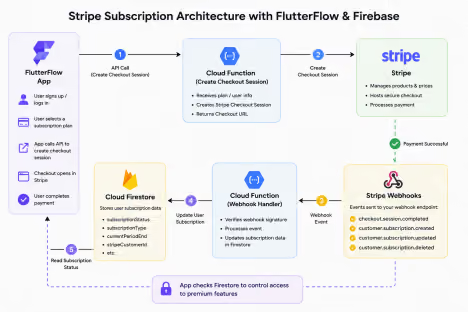
System Architecture
The integration follows a simple flow:
1. User selects a subscription plan in FlutterFlow.
2. FlutterFlow calls a backend API to create a Stripe Checkout Session. 3. Stripe handles the payment process.
4. Stripe sends webhook events to Firebase Cloud Functions.
5. Cloud Functions update Firestore subscription data.
6. FlutterFlow reads Firestore and grants access accordingly.
Prerequisites
Before starting, ensure you have:
● FlutterFlow Project
● Firebase Project
● Stripe Account
● Firebase Authentication enabled
● Firestore Database configured
● Blaze Plan enabled for Cloud Functions
How to Integrate Stripe in Flutterflow?
Step 1: Create Products and Prices in Stripe
Navigate to Stripe Dashboard and create your subscription products.
Example:
Product Name
Personal Membership
Monthly Price
$25/month
Yearly Price
$250/year
Stripe will generate unique Price IDs.
Example:
price_1ABCDEFxyz123
These Price IDs will later be used when creating Checkout Sessions.
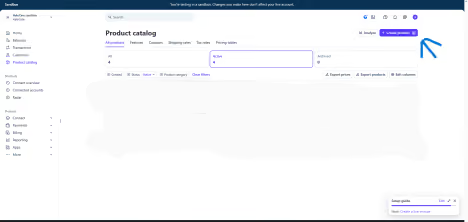
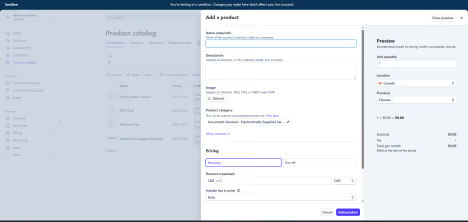
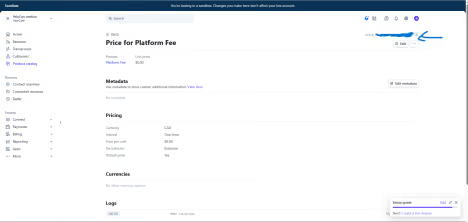
After creating the product, tap on it to navigate to pricing screen.
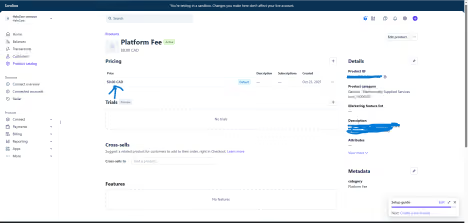
Copy the price id from this screen as this will be required in next steps.
Step 2: Create Firestore User Structure
Store subscription information inside the user document.
Example:
{
"email": "user@example.com",
"subscriptionStatus": "inactive",
"subscriptionType": "",
"stripeCustomerId": "",
"currentPeriodEnd": null
}
This allows the application to quickly determine whether a user should have premium access.
Step 3: Configure API Calls in FlutterFlow
Now we will configure our API calls in Flutterflow.
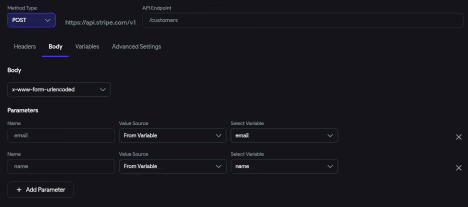
3.1 Create Customer API Call
First we need to make the user our stripe customer so we can get their customer id as it will be required in our checkout session API call.
3.2 Create Checkout Session API Call
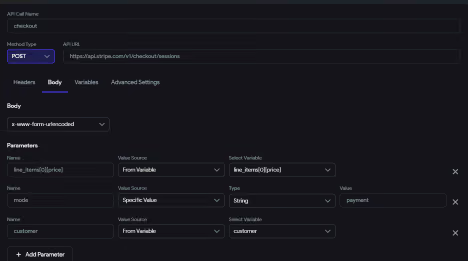
In checkout session api, we use the price id of the product that we copied earlier during the process, the mode is set to payment and the customer id is passed to identify the customer the subscription will be entitled to.
Step 4: Configure Stripe Webhooks
Webhooks notify your backend whenever a subscription changes.
Navigate to:
Stripe Dashboard
→ Developers
→ Webhooks
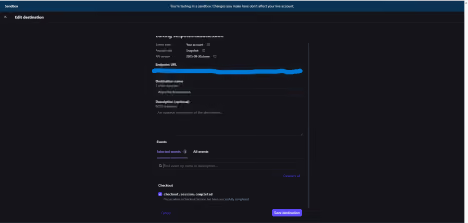
Add your Cloud Function endpoint.
Subscribe to:
checkout.session.completed
customer.subscription.created
customer.subscription.updated
customer.subscription.deleted
These events keep Firestore synchronized with Stripe.
Step 5: Create Webhook Handler Function
When Stripe sends an event, Firebase Cloud Functions receive it and process it. The webhook verifies the request and updates the corresponding Firestore user document. This ensures Stripe remains the source of truth for subscription data.
Step 6: Update Firestore Subscription Data
Whenever a subscription is created, renewed, or cancelled, update Firestore. Example:
{
"subscriptionStatus": "active",
"subscriptionType": "personal",
"currentPeriodEnd": "2026-06-30"
}
The app can now determine user access directly from Firestore.
Step 7: Protect Premium Features
Inside FlutterFlow, check the user's subscription status before displaying premium content. Example condition:
subscriptionStatus == active
If active:
Show Premium Features
If inactive:
Show Upgrade Screen
This keeps access management simple and centralized.
Step 8: Test the Integration
Enable Stripe Test Mode and use Stripe's test card.
4242 4242 4242 4242
Verify:
● Checkout opens successfully
● Payment completes
● Webhook fires
● Firestore updates
● Premium access is granted
Sample Webhook Handler
const functions = require("firebase-functions");
const admin = require("firebase-admin");
const stripe = require("stripe")(process.env.STRIPE_SECRET_KEY); admin.initializeApp();
exports.stripeWebhook = functions.https.onRequest(
async (req, res) => {
const event = req.body;
switch (event.type) {
case "customer.subscription.created":
const subscription = event.data.object;
await admin.firestore()
.collection("users")
.doc(subscription.metadata.uid)
.update({
subscriptionStatus: "active"
});
break;
case "customer.subscription.deleted":
const cancelled = event.data.object;
await admin.firestore()
.collection("users")
.doc(cancelled.metadata.uid)
.update({
subscriptionStatus: "inactive"
});
break;
}
res.status(200).send("Success");
}
);
(after deploying this cloud function, copy the function URL and paste it in your stripe’s webhook listener URL)
Firestore Security Rules
Your payment-related fields should never be editable by the client application. Although we added restrictions on UI, but they are only frontend related and if someone bypasses the rules they can access, and update any subscription details and can potentially update themselves to be a paid user without paying.
Only Cloud Functions should update them.
Example:
rules_version = '2';
service cloud.firestore {
match /databases/{database}/documents {
match /users/{userId} {
allow read: if request.auth.uid == userId;
allow update: if request.auth.uid == userId
&& !('subscriptionStatus' in request.resource.data.diff(resource.data).affectedKeys()) && !('subscriptionType' in request.resource.data.diff(resource.data).affectedKeys()) && !('stripeCustomerId' in request.resource.data.diff(resource.data).affectedKeys()) && !('currentPeriodEnd' in request.resource.data.diff(resource.data).affectedKeys());
}
}
}
This prevents users from manually changing their subscription status and gaining unauthorized premium access.
Conclusion
Using Stripe Checkout, Firebase Cloud Functions, and Firestore together provides a secure and scalable subscription system for FlutterFlow applications. Stripe manages billing, webhooks keep Firebase synchronized, and FlutterFlow simply reads subscription data to control access.
This architecture minimizes security risks, reduces client-side complexity, and ensures Stripe remains the single source of truth for all subscription activity.
.svg)
.svg)


.avif)
