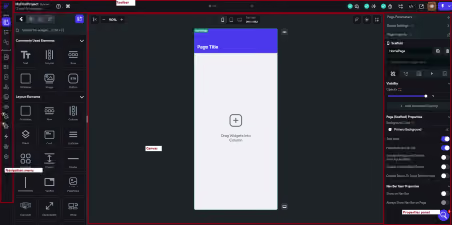
Introduction to Low-Code Development & FlutterFlow Overview
Low-code development is transforming how modern applications are built. Instead of writing thousands of lines of code manually, developers can use visual interfaces, drag-and-drop components, and pre-built logic to create applications more efficiently.
This approach significantly reduces development time while making app development accessible to both experienced developers and users with limited programming knowledge.
In this guide, you'll learn:
- What low-code development is
- Why low-code platforms are becoming popular
- What FlutterFlow is
- How FlutterFlow fits into the low-code ecosystem
- The benefits and limitations of using FlutterFlow
1. What is Low-Code Development?
Low-code development is a software development approach that enables applications to be built using visual tools rather than extensive manual coding.
Instead of creating every frontend and backend component from scratch, developers use:
- Drag-and-drop UI builders
- Pre-built components
- Visual workflows
- Built-in integrations
- Ready-made templates
Key Idea
Low-code platforms reduce the amount of traditional coding required while still allowing developers to add custom code whenever necessary.
Traditional Development vs Low-Code
Traditional DevelopmentLow-Code DevelopmentFull manual codingVisual developmentLonger development timeFaster developmentRequires advanced programming skillsBeginner-friendlySlower prototypingRapid prototypingHigher development costsLower development costsMore complex maintenanceEasier updates and maintenance
2. Why Low-Code Development is Becoming Popular
Low-code platforms solve many of the challenges associated with traditional software development.
Key Benefits
- Faster time to market
- Lower development costs
- Rapid prototyping and testing
- Reduced dependency on large engineering teams
- Greater accessibility for non-developers
- Faster business innovation
Common Use Cases
Low-code platforms are widely used for:
- Startup MVPs
- Internal business applications
- Mobile applications
- Web applications
- Admin dashboards
- CRM systems
- Workflow automation
- Customer portals
3. Introduction to FlutterFlow
FlutterFlow is a visual application development platform built on Google's Flutter framework. It enables users to create mobile and web applications using a drag-and-drop interface while generating production-ready Flutter code behind the scenes.
Developers can design interfaces, connect databases, integrate APIs, and deploy applications without writing large amounts of code.
Key Features
- Visual drag-and-drop UI builder
- Native Firebase integration
- REST API support
- Pre-built widgets
- State management
- Authentication workflows
- Responsive design tools
- One-click deployment
- Flutter code export
How FlutterFlow Works
Design UI
│
▼
Configure Data & Logic
│
▼
Generate Flutter Code
│
▼
Deploy to Mobile & Web
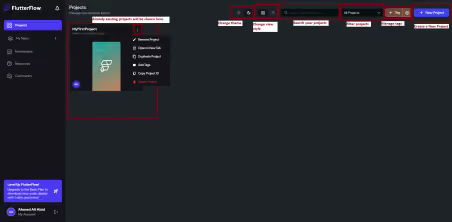

4. Why FlutterFlow is Popular
FlutterFlow has become one of the leading low-code platforms because it combines visual development with the power of Flutter.
It offers the flexibility of traditional development while dramatically reducing development time.
Advantages
- Rapid application development
- Clean Flutter code generation
- Mobile and web support
- Native Firebase integration
- API connectivity
- Production-ready applications
- Ideal for startups and MVPs
Limitations
- Advanced business logic may require custom code
- Some advanced features depend on platform updates
- Learning curve for complex workflows
- Highly customized UI may require Flutter development
5. Where FlutterFlow Fits in the Low-Code Ecosystem
FlutterFlow bridges the gap between no-code tools and traditional software development.
Development Spectrum
Platform TypeExamplesNo-CodeBubble, GlideLow-CodeFlutterFlowTraditional DevelopmentFlutter, React Native
FlutterFlow offers the ideal balance between:
- Development speed
- Customization
- Scalability
- Code ownership
6. Typical FlutterFlow Architecture
FlutterFlow UI Builder
│
▼
Flutter Framework
│
▼
Backend Services
(Firebase / REST APIs)
│
▼
Database + Authentication + Business Logic
Conclusion
Low-code development is reshaping software development by making application development faster, more affordable, and accessible to a broader range of users.
FlutterFlow stands out as one of the most powerful low-code platforms because it combines visual development with production-ready Flutter code generation.
Whether you're building an MVP, an internal business tool, or a production mobile application, FlutterFlow provides an excellent balance of speed, flexibility, and scalability.
Final Takeaway
For businesses, startups, and developers looking to accelerate app development without sacrificing quality, FlutterFlow is one of the best low-code platforms available today.
1. What is low-code development?
Low-code development is a software development approach that uses visual interfaces, drag-and-drop components, and pre-built logic to build applications with minimal manual coding. It speeds up development while reducing complexity.
2. What is FlutterFlow?
FlutterFlow is a visual low-code development platform built on Google's Flutter framework. It enables developers to create mobile and web applications using drag-and-drop tools while generating production-ready Flutter code.
3. Is FlutterFlow a no-code platform?
FlutterFlow is considered a low-code platform rather than a no-code platform. While many features can be built visually, developers can also add custom code, APIs, and advanced logic when needed.
4. What are the advantages of low-code development?
Low-code development offers faster development cycles, lower costs, rapid prototyping, easier collaboration, and reduced dependence on large development teams. It also enables non-developers to participate in application creation.
5. Can FlutterFlow build production-ready applications?
Yes. FlutterFlow generates production-ready Flutter code that can be deployed to Android, iOS, and web platforms. It also supports integrations with Firebase, APIs, authentication, and databases.
6. What types of applications can be built with FlutterFlow?
FlutterFlow can be used to build MVPs, e-commerce apps, booking systems, business dashboards, CRM platforms, educational apps, healthcare solutions, fintech applications, and enterprise software.
7. Does FlutterFlow require coding?
No, basic applications can be created without writing code. However, developers can add custom Dart code, integrate third-party APIs, and implement advanced functionality whenever required.
8. What are the limitations of FlutterFlow?
FlutterFlow may require custom coding for highly complex business logic, advanced UI customizations, or specialized integrations. Some advanced features also depend on updates to the platform.
9. How does FlutterFlow compare to traditional Flutter development?
FlutterFlow provides visual development tools that significantly speed up the app-building process while still generating Flutter code. Traditional Flutter development offers greater flexibility but requires extensive programming knowledge.
10. Why is FlutterFlow becoming so popular?
FlutterFlow is gaining popularity because it combines rapid visual development with Flutter's performance, supports Firebase and API integrations, generates exportable code, and helps businesses launch applications much faster than traditional development.


.avif)