
We are Official Certified bubble.io & flutterflow App Development partner


A Complete Developer Tutorial
FlutterFlow is a low-code visual development platform that allows developers and non-developers alike to build fully functional mobile and web applications without writing every line of code from scratch. It provides a drag-and-drop interface for designing screens, connecting data sources, and configuring business logic — all within a browser-based environment.
Under the hood, FlutterFlow generates production-ready Flutter (Dart) code and integrates tightly with Firebase — Google's mobile and web development platform. This includes Firebase Authentication for user login, Cloud Firestore as the NoSQL database, and Firebase Storage for file uploads.
Security Rules are access control policies enforced by Firebase on the server side. They determine who can read, write, create, or delete data inside your Cloud Firestore database — before any request reaches your actual data.
Without Security Rules, your database is either wide open to anyone on the internet, or locked completely shut. Neither extreme is desirable for a real application. Security Rules give you fine-grained, declarative control over exactly who can do what with which data.
💡 Key Insight
Security Rules live inside Firebase — not inside your app. Even if someone bypasses your app's UI and calls the Firestore API directly (e.g. from a script or Postman), the rules will still protect your data. This makes them your last line of defence.
Without correctly configured Security Rules, your application is vulnerable to a range of serious risks:
FlutterFlow provides a built-in Security Rules editor that lets you configure these protections visually, without needing to write raw Firebase rules syntax from scratch.
FlutterFlow exposes four core operations that map directly to Firebase Security Rule actions. You configure each one per collection:
For each of the four operations above, FlutterFlow allows you to choose from the following access levels:
⚠️ Important
The 'Tagged Users' option requires that the document contains a field holding either a Firestore User Reference or a String containing the user's UID. FlutterFlow will ask you to select this field when you choose 'Tagged Users'.
Below the main rule selectors, FlutterFlow provides three optional checkboxes that fine-tune how rules are applied and managed. Understanding them is essential.
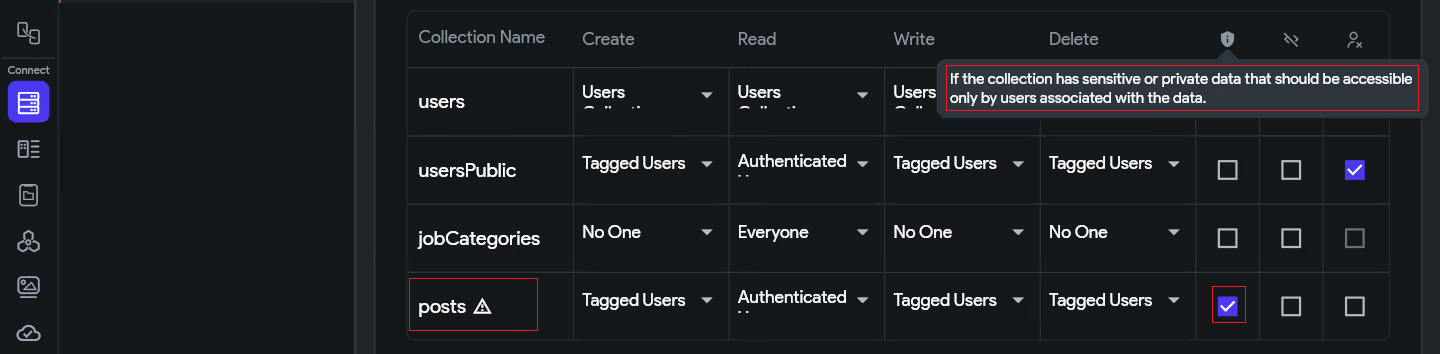
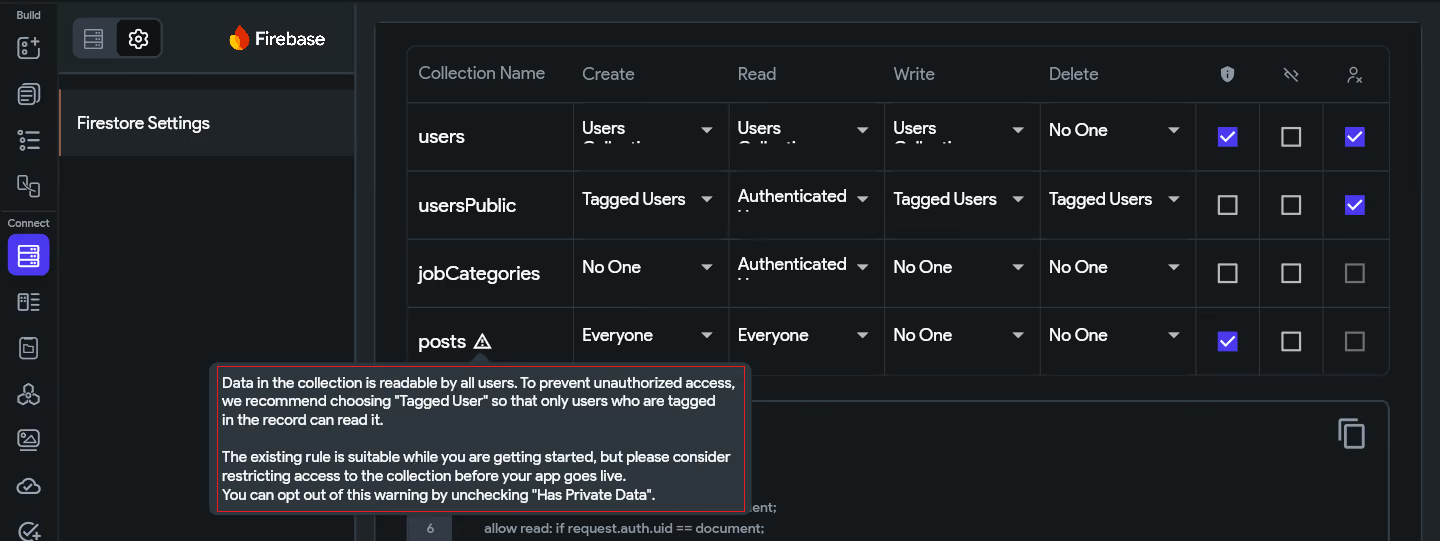
Marking a collection as 'Has Private Data' is a safety flag. It tells FlutterFlow: this collection contains sensitive information that should not be broadly accessible. It does not change the rule itself — it activates a warning system that alerts you if your access rules look too permissive for sensitive data.
When this checkbox is enabled and your rules allow broad access (e.g., Read → Everyone), FlutterFlow will display a warning banner prompting you to tighten the rules before deployment. Think of it as a safety net for your own mistakes.
💬 Example 1: One-to-One Chat Messages
Collection: messages | Read Rule: Tagged Users (participants)
In a chat app, a message document might have a participants field containing references to both users in the conversation. Read is set to Tagged Users so only those two people can access the messages.
✅ Has Private Data: ON — because an authenticated user who is NOT part of that chat must still be blocked. If you accidentally change Read to 'Authenticated Users', FlutterFlow will immediately warn you that private data is now exposed to everyone in the app.
👤 Example 2: User Profiles (Sensitive Fields)
Collection: users | Read Rule: Users Collection
The users collection typically holds phone numbers, addresses, date of birth, and other personal details. The Users Collection rule already restricts each user to their own profile document.
✅ Has Private Data: ON — because if a rule misconfiguration accidentally opens Read to 'Everyone', personal details of all users become publicly readable. The flag ensures FlutterFlow warns you before that ever gets deployed.
📝 Example 3: Private Notes or Diary Entries
Collection: notes | Read Rule: Tagged Users (owner_ref)
A notes app where each note belongs to one user. Only the creator should ever read their own notes — not other authenticated users, not guests.
✅ Has Private Data: ON — highly personal content. Any accidental loosening of the Read rule should be caught immediately by FlutterFlow's warning system.
📢 Example 4: Public Posts Feed (Leave it OFF)
Collection: posts | Read Rule: Everyone
In our social feed use case, posts are intentionally public. All visitors — including guests — are meant to read them. There is no sensitivity here.
❌ Has Private Data: OFF — enabling it would generate misleading warnings in FlutterFlow, since 'Everyone can read' is the correct and intended behaviour for this collection.
Rule of thumb: If any authenticated user who is not the document owner should be blocked from reading it — enable Has Private Data. If the data is genuinely meant for broad access, leave it off.
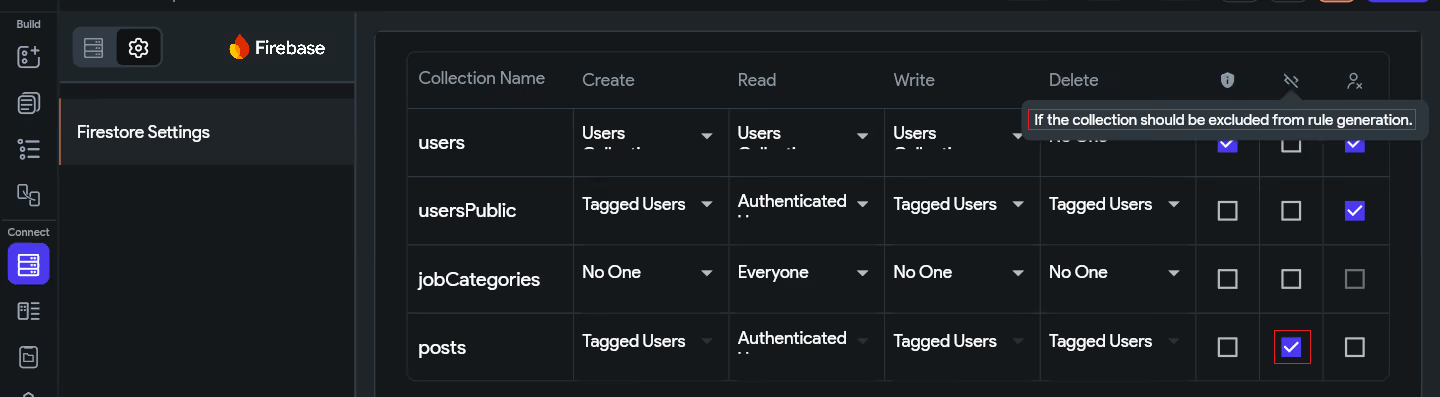
When 'Exclude' is checked on a collection, FlutterFlow will NOT include that collection in the rules it generates and deploys. This means the collection's rules are entirely managed by you — outside of FlutterFlow.
This is the escape hatch for advanced use cases. If you need custom, complex logic (e.g., rate-limiting, cross-collection validation, or multi-tenant access control) that FlutterFlow's UI cannot express, check 'Exclude' and write the rules manually in the Firebase Console.
When to use Exclude
Use Exclude when:
• You need advanced rule logic beyond 4 access levels
• You are validating field contents or document size
• You require cross-collection lookups in your rules
• You want to manage rules entirely in the Firebase Console
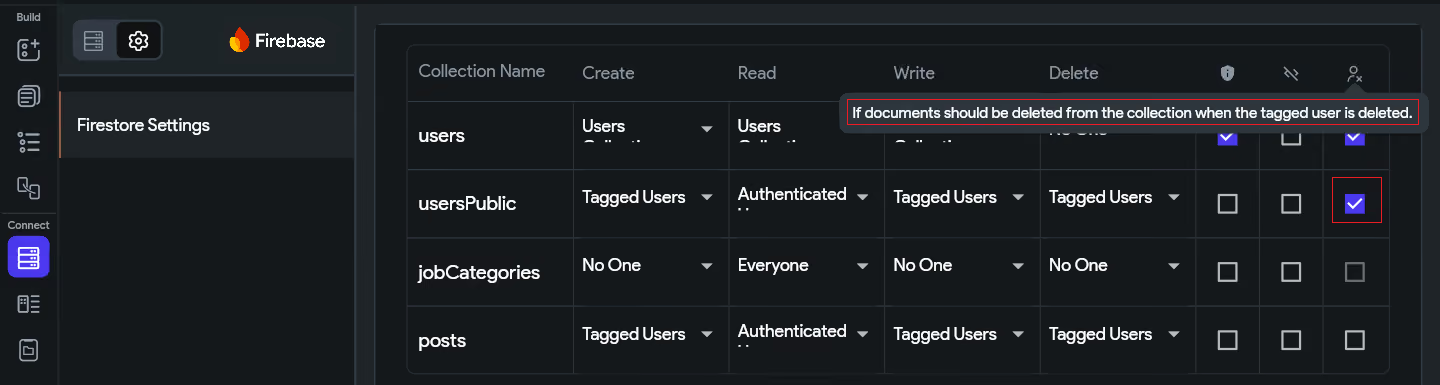
This checkbox applies only when the Delete rule is set to 'Tagged Users'. When enabled, FlutterFlow automatically deletes all documents in this collection that are associated with a user when that user account is deleted from your app.
This is important for GDPR compliance and general data hygiene. If a user deletes their account, you likely want all their posts, messages, and private records removed from Firestore as well. Enabling this checkbox automates that cleanup.
Example
A posts collection has Delete set to 'Tagged Users' referencing the created_by field. With 'Delete Reference Data' checked: when User A's account is deleted, all posts where created_by == User A are automatically deleted too.
FlutterFlow's rule editor is accessed through the Firestore Settings panel. Here is how to navigate there and configure each rule type.
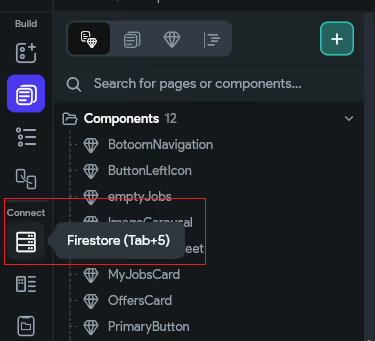
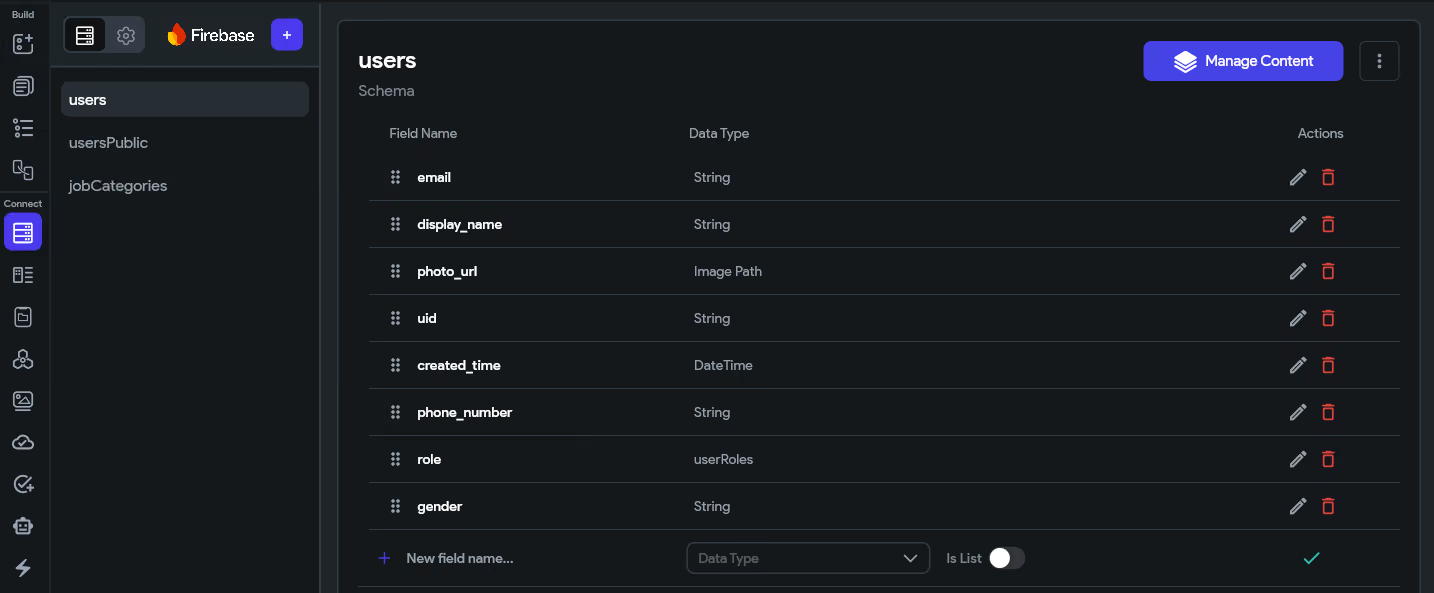
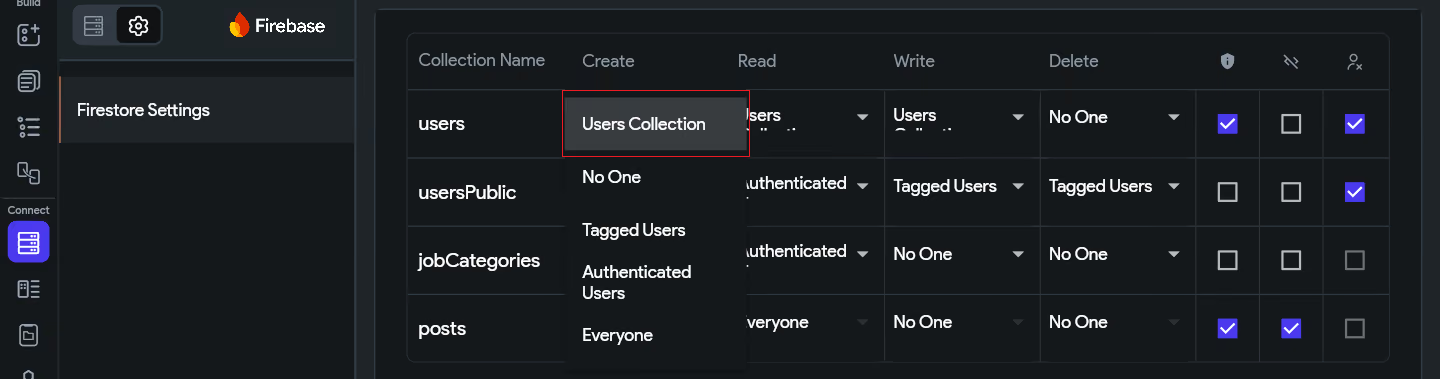
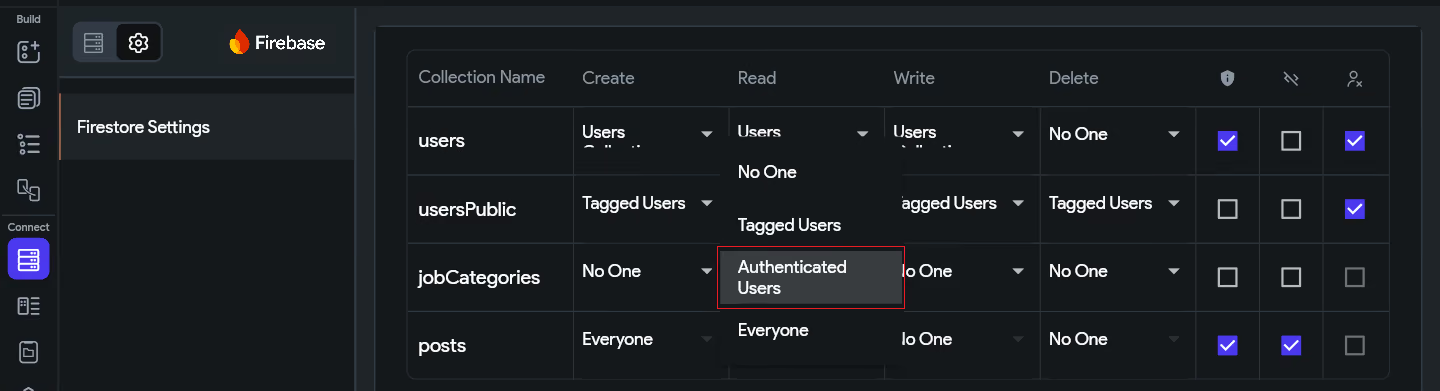
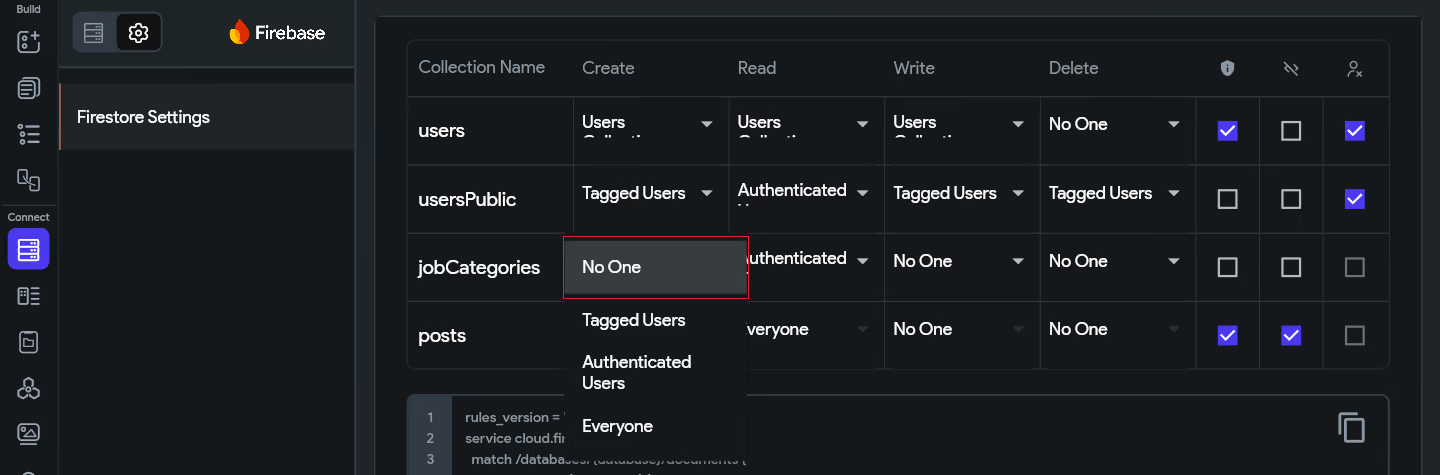
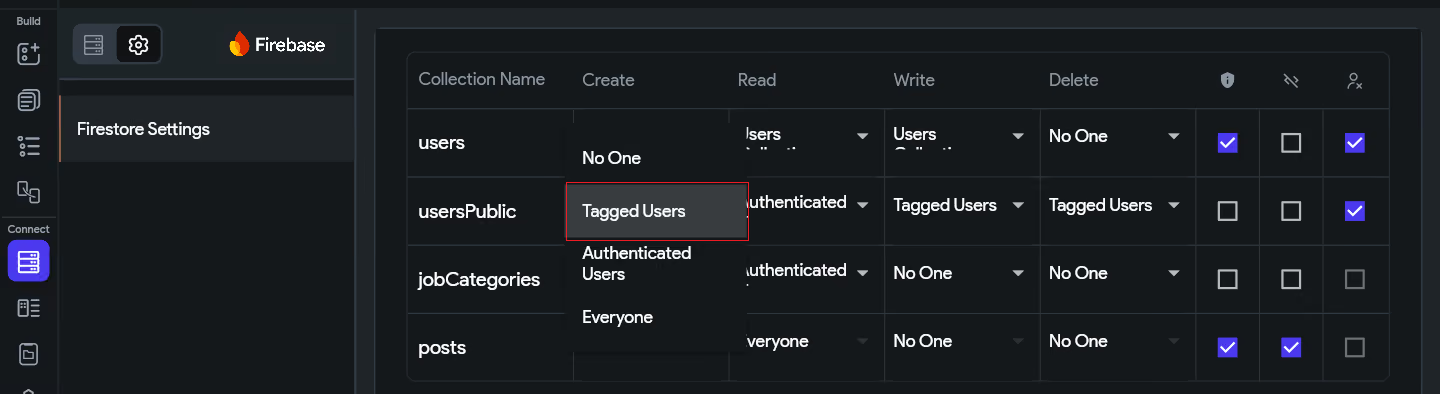
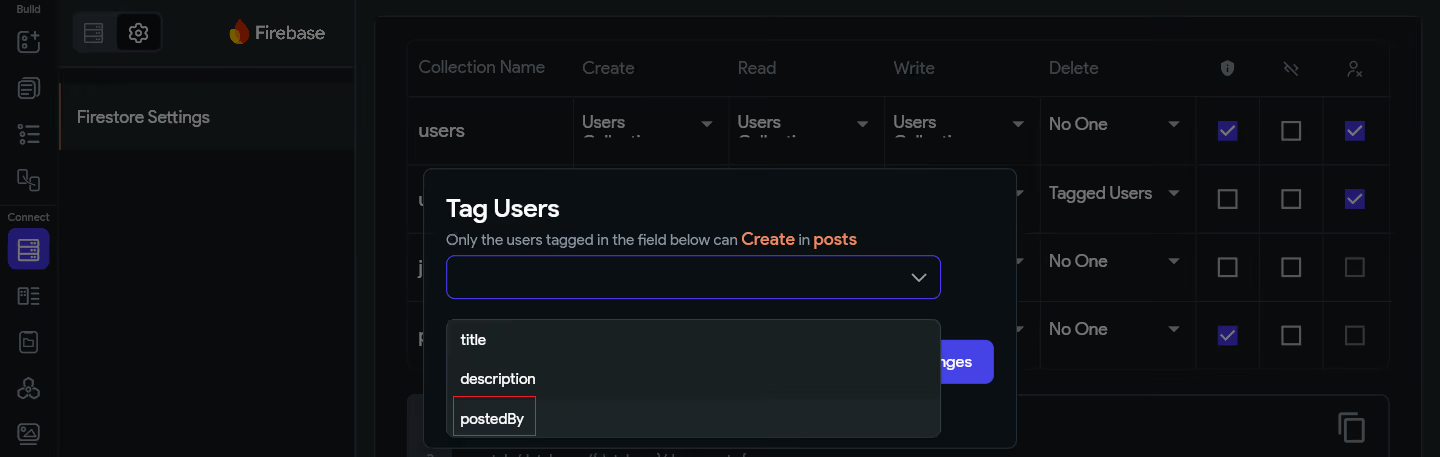
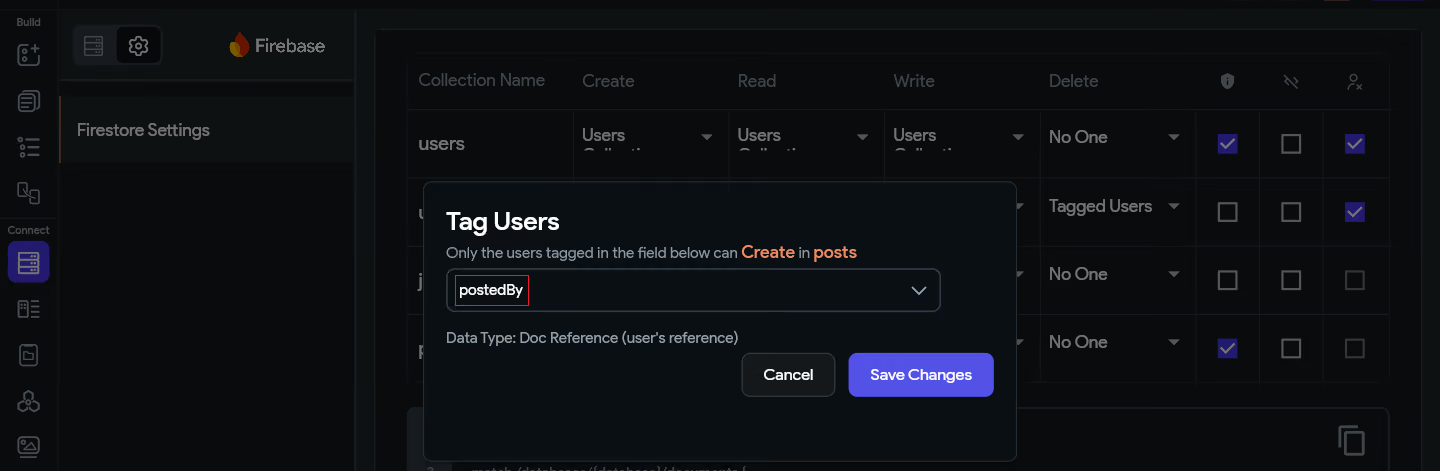
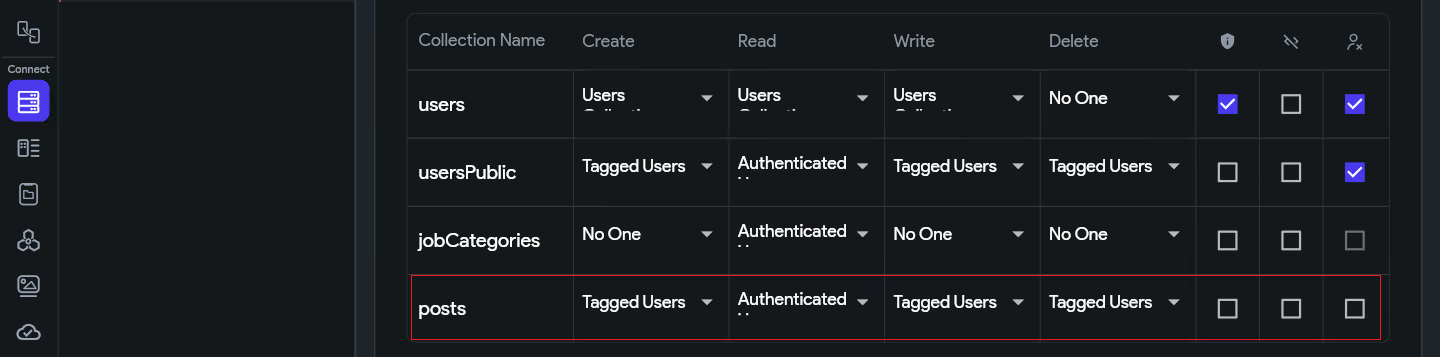
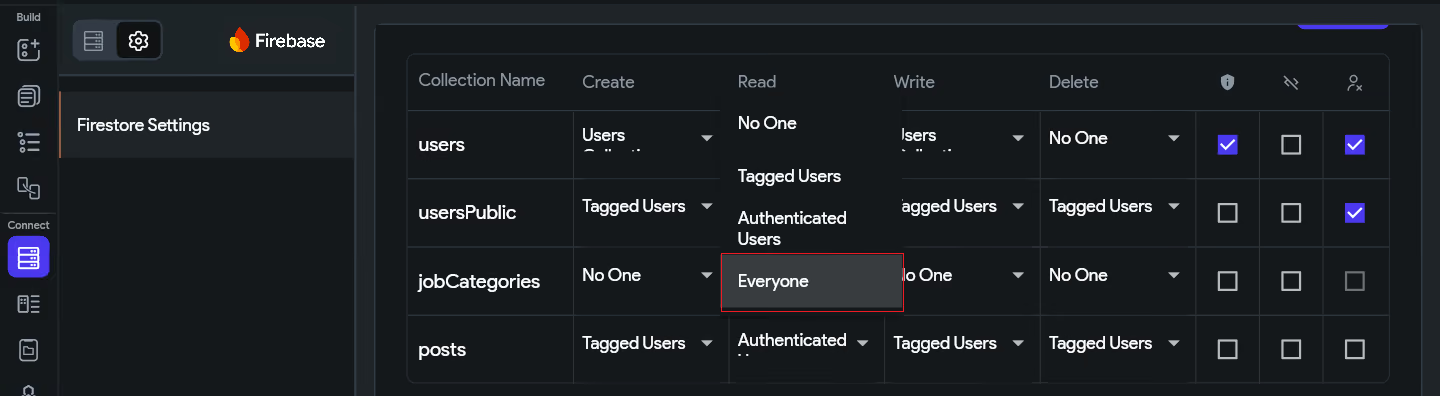
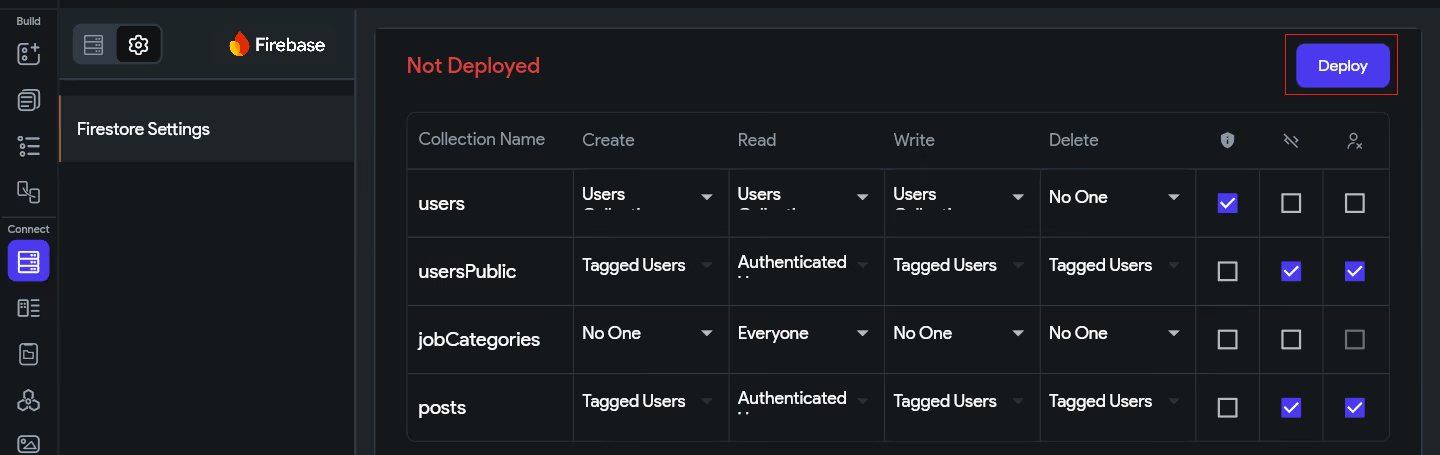
Important: Rules do not take effect until you deploy them. Any time you modify rules, you must deploy.
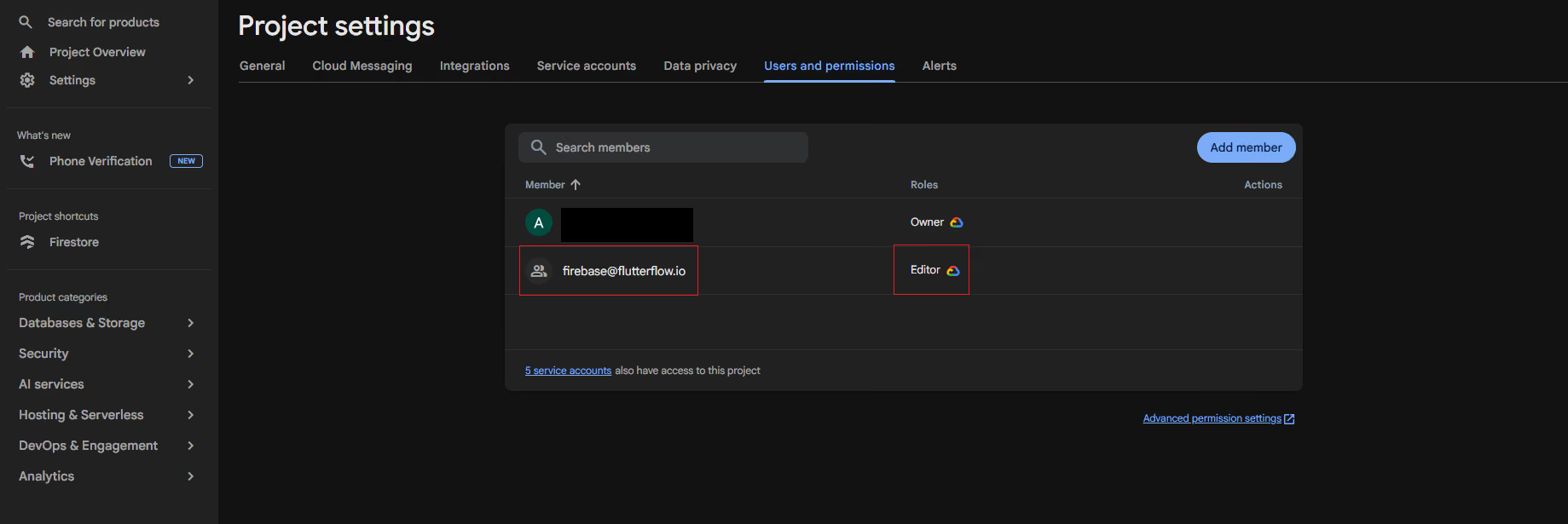
⚠️ Caution Before Going Live
Before publishing your app to production, remove the default Firebase Test Mode rule: allow read, write: if true;
This rule grants full access to everyone and is only meant for development. FlutterFlow will warn you if it detects this rule is still active.
To bring everything together, let's walk through a real-world scenario and apply security rules step by step.
📌 Scenario
We are building a social feed app where:
• Any registered user can create a post.
• All users (even guests) can read and view posts in the feed.
• Only the user who created a post can edit it.
• Only the user who created a post can delete it.
• When a user deletes their account, all their posts are deleted too.
• The posts collection contains personal content — flag it as private data.
Ensure your Firestore collection is named 'posts' and contains at least the following fields:
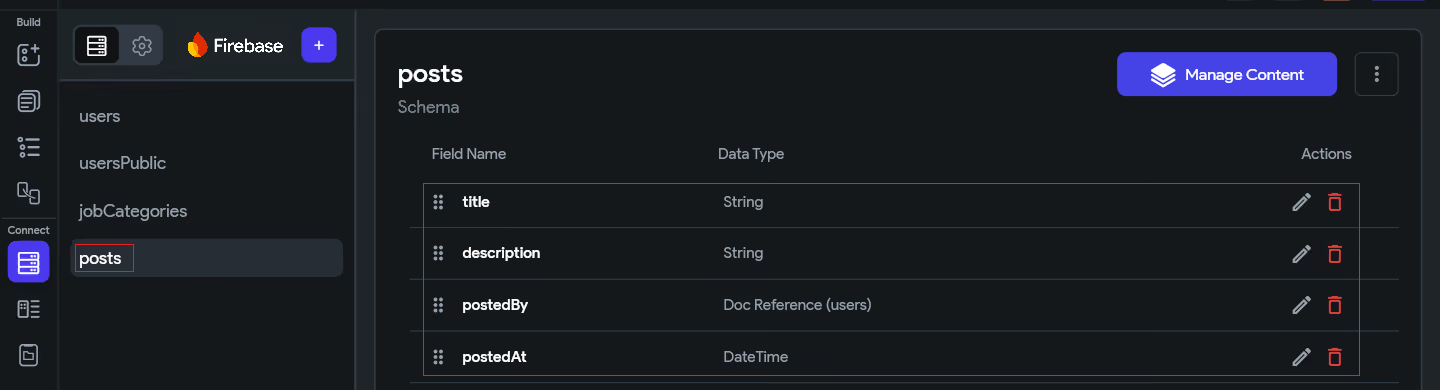
In FlutterFlow, navigate to the Firestore settings for your project as described in Section 5. Locate the 'posts' collection entry in the rules list.
Step 3 Create → Authenticated Users
Requirement: Only registered, signed-in users can publish a new post.
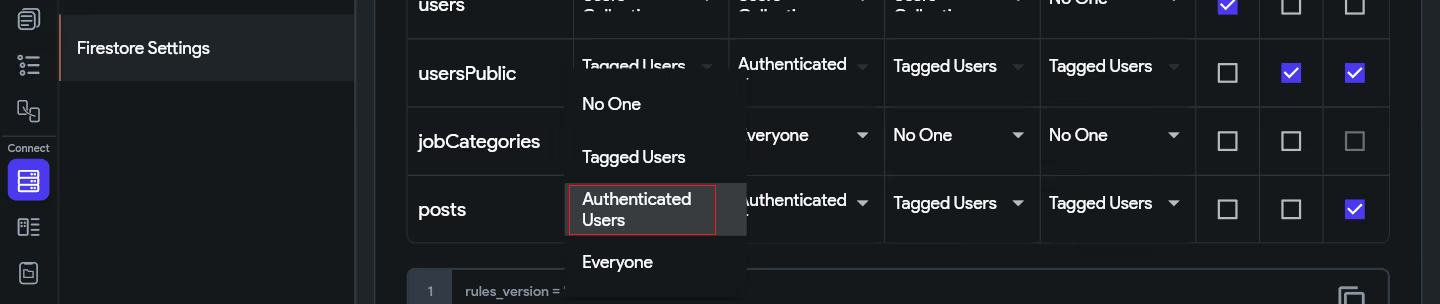
Why not Everyone?
If 'Create' were set to 'Everyone', anonymous users and bots could flood your database with fake posts. Restricting to Authenticated Users ensures only real, verified accounts can post.
Step 4 Read → Authenticated
Requirement: All logged in users can browse and read posts in the feed.
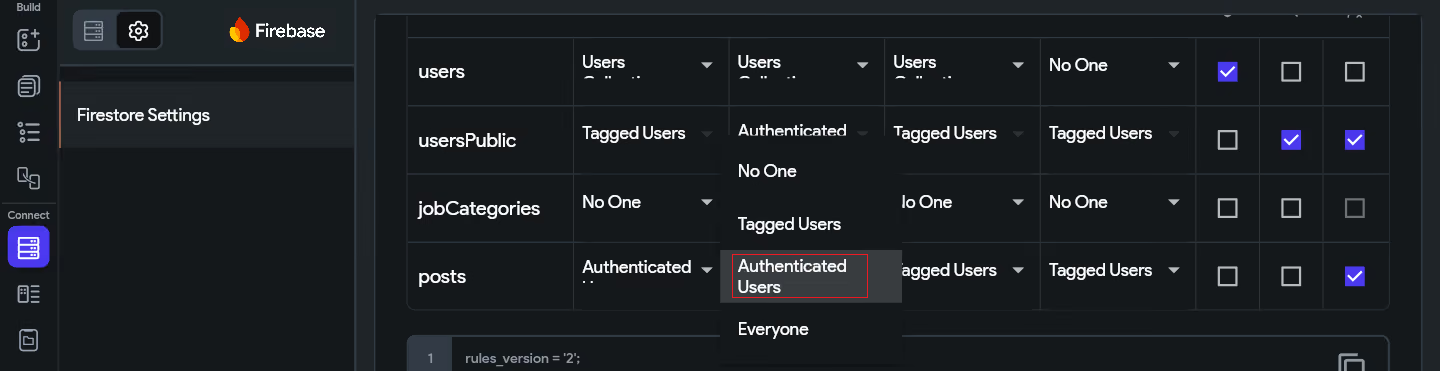
Public Read + Has Private Data
Since we are enabling public reads (Everyone) but the posts may contain personal content, enable the 'Has Private Data' checkbox. This serves as a reminder flag and will warn you if you accidentally loosen access in the future.
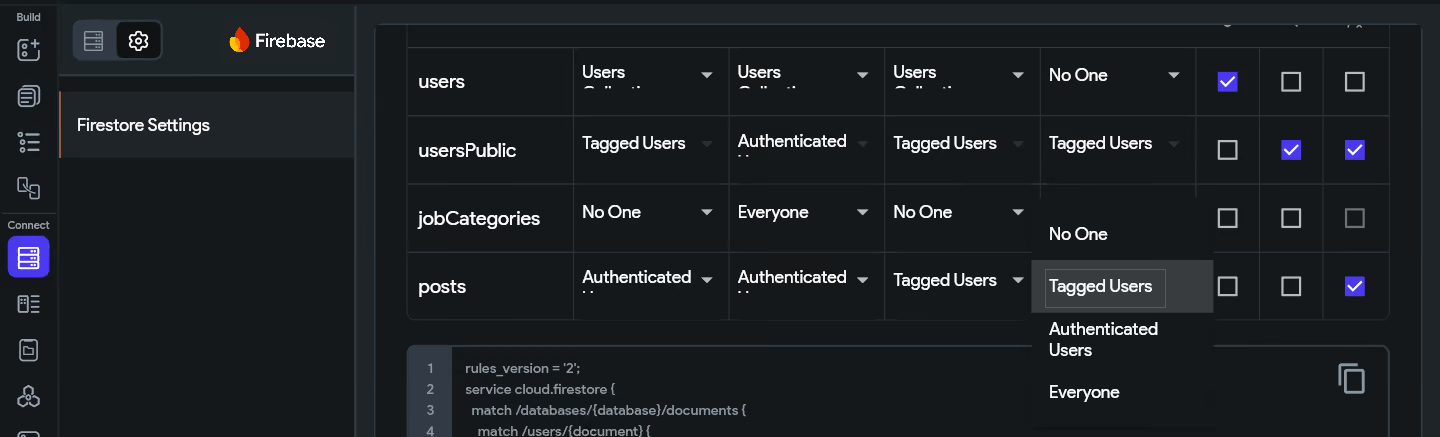
Step 5 Write → Tagged Users (created_by)
Requirement: Only the user who originally created a post can edit (update) it.
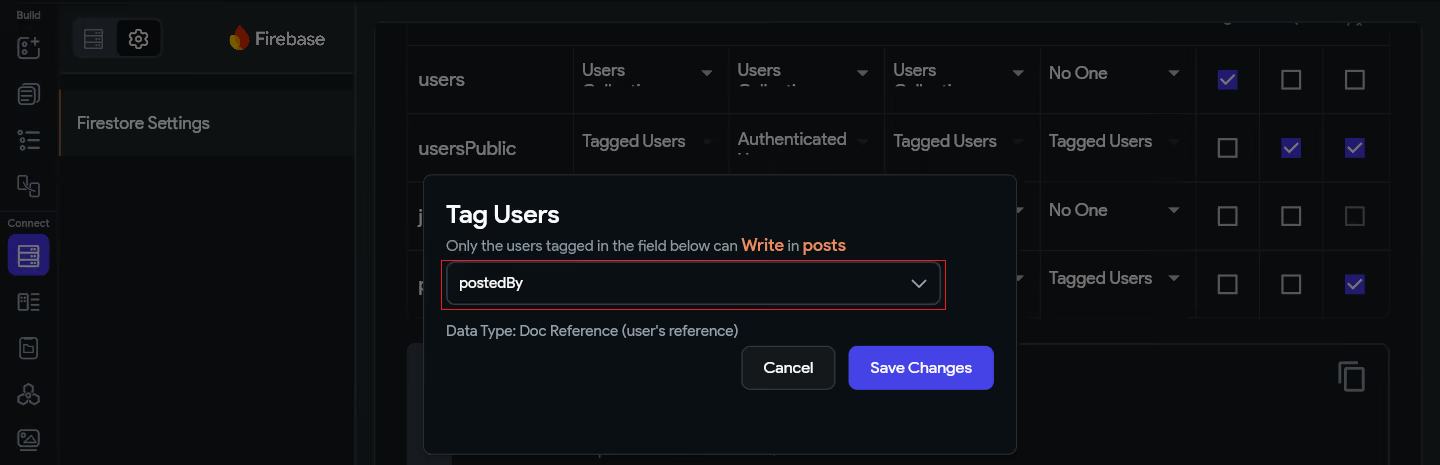
How 'Tagged Users' Works Behind the Scenes
FlutterFlow generates a Firebase rule that checks whether the currently authenticated user's UID matches the reference stored in the created_by field of the document being edited. If they match — access is granted. If not — the request is rejected by Firebase.
Step 6 Delete → Tagged Users (created_by) + Delete Reference Data
Requirement: Only the original author can delete their post. When the author deletes their account, their posts should be deleted too.
Step 7 Has Private Data → OFF for public posts
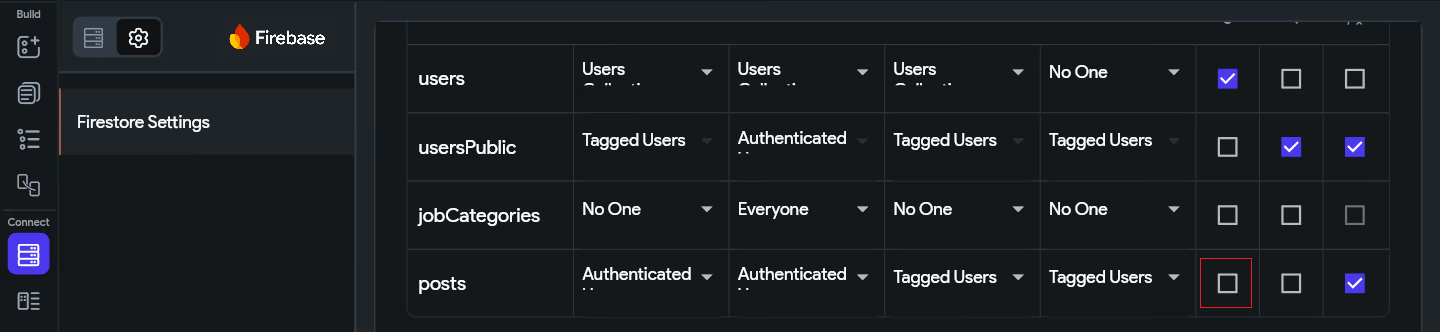
Since posts in our use case are intentionally public (Read → Everyone), the Has Private Data checkbox should remain unchecked. Posts are meant to be read by all visitors — there is no sensitive content to protect here.
Enabling it would cause FlutterFlow to show unnecessary warnings about your 'Everyone' Read rule, even though that is the correct and desired setting. Reserve Has Private Data for collections like private messages, user profiles, or personal notes where restricted access is the intent.
Step 8 Deploy the Configured Rules
✅ Deployed Rules Summary for 'posts'
Create → Authenticated Users (only logged-in users can post)
Read → Everyone (public feed, all users can view)
Write → Tagged Users (created_by) (only author can edit)
Delete → Tagged Users (created_by) (only author can delete)
Has Private Data → ❌ OFF (posts are intentionally public)
Delete Reference Data → ✅ ON (clean up posts on account deletion)
For complex apps, FlutterFlow's visual rule editor may not be sufficient. If you check the 'Exclude' option on a collection, you can write raw Firebase Security Rules directly in the Firebase Console.
For example, to add email verification, field validation, or cross-collection lookups, your custom rule for the 'posts' collection might look like this:
To deploy custom rules from the Firebase Console:
Writing raw Firebase Security Rules gives you full control over all of the above scenarios and more. For a complete, step-by-step guide covering custom rule syntax, helper functions, field validation, role-based access, and multi-collection logic, refer to the advanced guide here:
📖 Advanced Firestore Security Rules Guide
Rule / Setting
What It Does
Our Posts Use Case
Create → Auth Users
Only signed-in users can add documents.
Only logged-in users can post.
Read → Everyone
Anyone can fetch documents, even guests.
All visitors see the post feed.
Write → Tagged Users
Only the user in the named field can update.
Only the post author can edit.
Delete → Tagged Users
Only the user in the named field can delete.
Only the post author can delete.
Has Private Data
Flags collection as sensitive; warns if rules are too permissive.
❌ OFF — posts are public by design.
Exclude ☑
Removes collection from FlutterFlow-managed rules.
Used for advanced custom rule collections.
Delete Ref. Data ☑
Cascades deletes linked records on user removal.
Deletes posts when the author's account is removed.
FlutterFlow Security Rules Tutorial · Built with FlutterFlow & Firebase
.svg)
.svg)


.avif)
