How to Build Secure FlutterFlow Apps with Advanced Firebase Security Rules
Advanced Security Rules
Firebase Firestore — Beyond FlutterFlow UI
A Practical Developer Guide using Posts & Chat Use Cases
1. Introduction
FlutterFlow and Firebase — A Quick Recap
FlutterFlow is a visual low-code platform for building Flutter applications. It connects natively to Google Firebase, using Cloud Firestore as the primary database layer. FlutterFlow generates production Flutter/Dart code behind the scenes and deploys it alongside Firebase backend services — meaning your data security is ultimately governed by Firebase, not your app's UI.
Every read, write, create, and delete request your app makes goes through Firebase before it reaches any data. This is where Security Rules live — and where advanced rules become essential for real-world applications.
What are Firestore Advanced Security Rules?
Firestore Security Rules are server-side access control policies written in a declarative language specific to Firebase. They evaluate every incoming request against conditions you define, and either allow or deny the operation before it reaches your database.
The 'advanced' aspect refers to rules that go beyond the four simple dropdowns FlutterFlow provides in its UI. Advanced rules allow you to:
Validate field values: Ensure required fields exist, are non-empty, or fall within acceptable ranges before a document is written.
Write custom helper functions: Reusable logic blocks (like isSignedIn() or isOwner()) that keep rules readable and maintainable.
Cross-collection lookups: Check data in a different Firestore collection as part of the rule evaluation — e.g., verify a user has an active subscription.
Multi-participant access: Allow access based on array membership — e.g., any participant listed in a chat's participants array can read its messages.
Role-based access control: Grant different permissions to admins, moderators, and regular users based on a role field stored in their user document.
Conditional field protection: Allow updates only to specific fields, preventing users from overwriting critical fields like created_by or created_at.
🔑 Core Principle
Advanced rules run entirely on Firebase servers. They cannot be bypassed by modifying the app, intercepting network calls, or using the Firebase SDK directly from a browser console. No matter how a request reaches Firebase — through your app, a script, or a REST call — the rules evaluate it the same way.
2. Why Advanced Rules — The Critical Gap
The Illusion of Security: UI Filtering vs. Server Rules
This is one of the most misunderstood aspects of app development, and understanding it correctly is the single most important reason to implement advanced rules.
⚠️ Real Scenario: The Filtered Query Problem
Imagine you have a posts collection. In FlutterFlow, you build a query to show 'My Posts' — you add a filter: created_by == currentUser. The screen displays only your posts. Everything looks correct.
But here is what is actually happening behind the scenes:
1. FlutterFlow sends a Firestore query with a where clause to the database.
2. Firebase loads ALL documents that pass the Security Rule check — not the UI filter.
3. If your Read rule is set to 'Authenticated Users' (or worse, 'Everyone'), Firebase returns ALL posts to the app.
4. FlutterFlow then applies the created_by filter CLIENT-SIDE, hiding the other posts from the visible list.
5. The other posts are FULLY LOADED in memory and visible in the browser's developer console or a network inspector.
A malicious user only needs to open DevTools → Network tab → inspect the Firestore WebChannel response to see every post loaded — regardless of the UI filter.
Visualising the Problem
Without Server Rules ❌
With Server Rules ✅
App requests posts...
Firebase returns all 500 posts.
App requests posts...
Firebase Security Rules check:
created_by == currentUser
App filters the data to show only your posts.
Firebase returns only your 3 posts.
DevTools can still see all 500 posts.
A malicious user can harvest all data.
DevTools only shows your 3 posts.
Data never leaves the server, so there is nothing to steal.
Where FlutterFlow UI Rules Fall Short
FlutterFlow's built-in rule editor covers the most common scenarios well. But there are several situations where it simply cannot express what you need:
FlutterFlow UI Limitation
Real Scenario Where It Fails
Validation
No field validation rules
A user submits a post with an empty title. The UI may block it, but Firebase Security Rules cannot rely on UI validation because direct API calls can bypass the check completely.
Conditions
No combined conditions
You need a rule like: only authenticated users whose email is verified and who have accepted terms can create posts. FlutterFlow UI conditions cannot fully enforce this security logic.
Arrays
Single field tagging only
In a group chat, any of 10 participants should be able to read messages. The UI cannot properly handle advanced conditions like array-contains logic for participant-based access.
Database Checks
No cross-collection checks
Only users with an active subscription document inside the subscriptions collection should be allowed to create premium posts. This requires checking data across collections.
Roles
No role-based access
Admins may need permission to delete any post, moderators may update posts, while regular users should only manage their own content. This requires proper role-based authorization.
Field Protection
No field-level protection
You may need to prevent users from changing sensitive fields like created_by or created_at while editing a post. This requires server-side security rules.
3. Types of Firestore Security Rules
Firestore Security Rules are built from a small set of composable primitives. Understanding each one is essential before writing any custom rules.
Rule Type
Syntax
What It Does
Create
Allow Create
allow create: if
Controls who can add a new document to a collection. It is evaluated when the document does not exist yet.
Read
Allow Read
allow read: if
Controls who can fetch documents or execute queries against a collection. It covers both get and list operations.
Write
Allow Write
allow write: if
A shortcut rule that includes create, update, and delete operations. Use it when the same condition applies to all write actions.
Update
Allow Update
allow update: if
Controls who can modify an existing document. It is more specific than write because it only applies to edits.
Delete
Allow Delete
allow delete: if
Controls who can permanently remove documents from a Firestore collection.
Functions
Helper Functions
function name() {}
Reusable blocks of logic that can be called inside rule conditions. They improve readability and prevent repeating the same logic.
Request Data
Request Object
request.auth, request.resource
Represents the incoming request. It contains the authenticated user's identity and the data being created or updated.
Existing Data
Resource Object
resource.data
Represents the existing Firestore document before the operation. It is commonly used to verify current values, such as the original creator.
Lookup
get() Function
get(/databases/...)
Retrieves another Firestore document during rule evaluation. Useful for cross-collection checks, such as verifying user roles from a users collection.
Validation
exists() Check
exists(/databases/...)
Checks whether a document exists without retrieving its data. Useful for verifying membership, subscriptions, or permissions.
Wildcard
Match
match /{docId}
Matches any document ID inside a collection. The captured document ID can be used inside rule conditions.
Recursive
Recursive Wildcard
match /{path=**}
Matches documents and subcollections at any depth. It is commonly used as a fallback rule pattern.
4. How Rules Work: Client-Side vs Server-Side
Understanding where data filtering happens is the most critical concept in app security. The distinction between client-side and server-side determines whether your data is truly protected or merely hidden.
When you add a filter to a FlutterFlow query — such as 'show posts where created_by == currentUser' — you are adding a WHERE clause to the Firestore SDK request. This tells Firestore to return only matching documents. However, this filtering only works if the Security Rule also permits the read. If the rule says 'Authenticated Users can read all posts', then the full dataset is accessible regardless of what your app's query requests.
🔍 What Happens in the Browser DevTools
Open any Chrome browser. Go to DevTools → Network tab → filter by 'firestore'. Every document your app loads — even ones filtered from the UI — appears in full in the network response payload.
A non-technical user sees only their posts on screen. A developer or attacker opens DevTools and reads all 500 posts that were loaded but filtered client-side. This takes under 30 seconds and requires no hacking skill whatsoever.
This is not a theoretical threat. It is a standard technique used to extract data from apps with poor security rule configuration.
Server-Side Rules (What Firebase Enforces)
When a Firestore Security Rule evaluates a request, it runs on Google's servers before any data is returned. If the rule denies the operation, Firebase returns an error — not the data. The document bytes never travel over the network to the client at all.
This means even if a developer inspects network traffic, intercepts the SDK calls, or uses the Firebase REST API directly, they will receive a PERMISSION_DENIED error for any document their rule does not permit.
Aspect
Client-Side Filter (FlutterFlow Query)
Server-Side Rule (Firebase)
Where it runs
Client
Inside your app after data is received.
Server
On Firebase servers before data is sent to the application.
Can it be bypassed?
Yes. Users can bypass client-side logic using DevTools, scripts, or direct SDK/API calls.
No. Rules are evaluated on Firebase servers and cannot be skipped by the client.
Does data travel over the network?
Yes. Documents are sent to the app first and then filtered locally.
No. Documents that fail security rules never leave the server.
Protects against DevTools?
❌ No
✅ Yes
Protects against scripts?
❌ No
✅ Yes
Billing impact
All documents loaded by the query count as Firestore reads, even if they are filtered afterward.
Denied documents are blocked before delivery and do not count as successful reads.
💰 Performance and Cost Benefit
Server-side rules do not just protect privacy — they protect your Firebase bill. Firestore charges per document read. If a query without proper rules loads 500 posts just to show 3, you pay for 500 reads. With a server-side rule that filters at the source, Firebase returns only the 3 relevant documents. At scale, this difference is significant.
5. Key Concepts Before Writing Rules
The request and resource Objects
Every rule condition has access to two built-in objects that describe the incoming operation and the existing state of the database.
Used to verify the authenticated user's ID, email address, and verification status before allowing access or actions.
request.resource.data
New Data
Validating incoming writes.
Contains the new field values being created or updated. It is used to validate document contents during create or update operations because this data does not exist yet.
resource.data
Existing Data
Checking current document values.
Contains the existing Firestore document before the operation. Commonly used to verify ownership during update or delete actions, such as checking who originally created the document.
request.time
Time Rules
Time-based access control.
Provides the current Firebase server timestamp. Useful for implementing rate limits, expiration checks, and temporary access windows.
How to access Advanced Rules
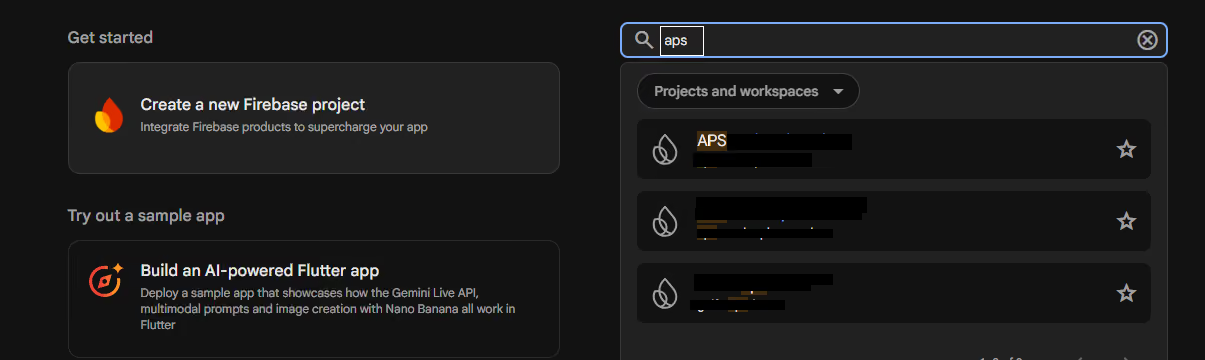
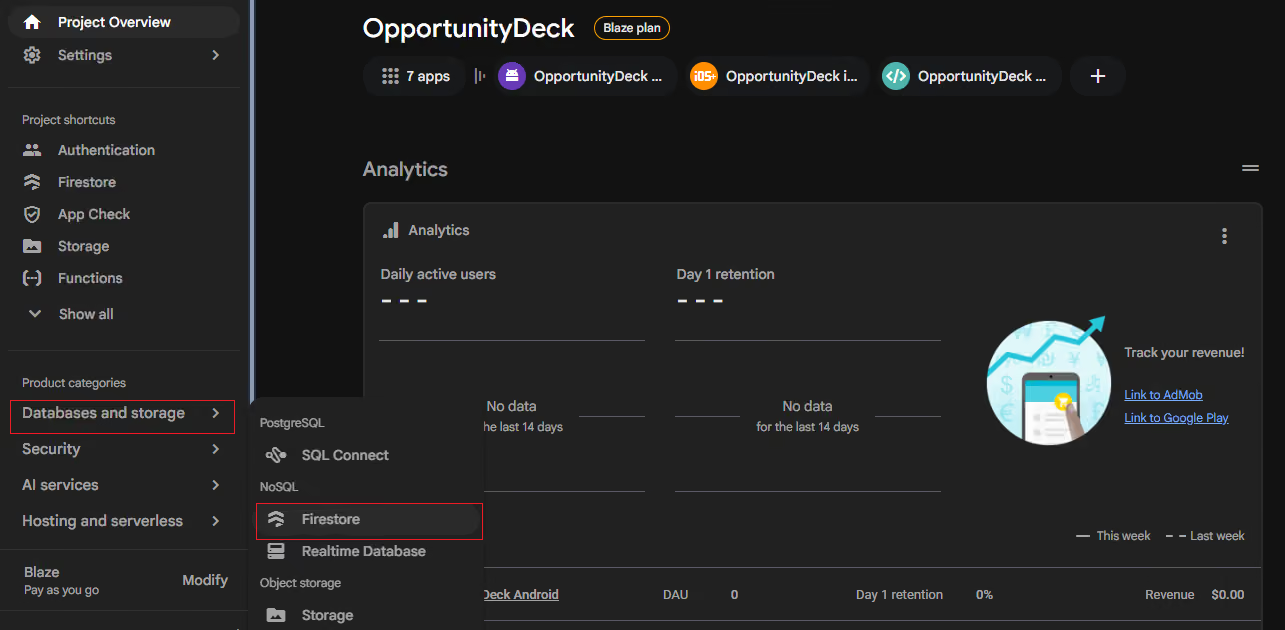
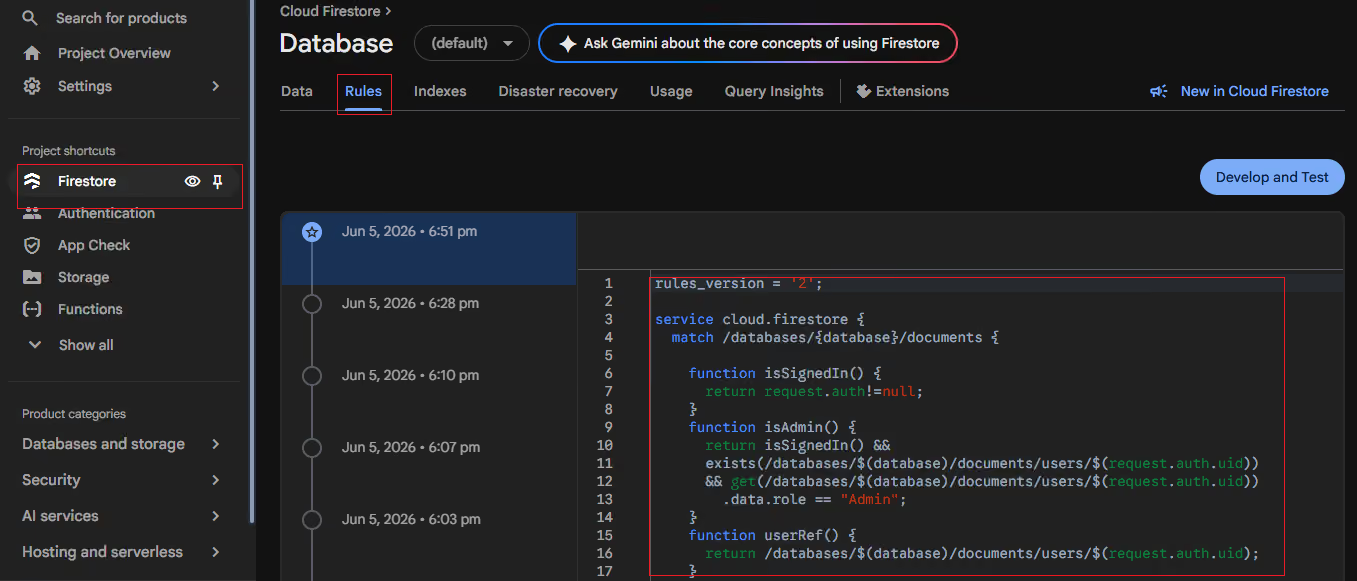
Go to the Firebase and search for the project, then from left side, access the Firestore. Here is the tab named as Rules where you can apply all of them.
Helper Functions — Keeping Rules Clean
Rather than repeating the same condition across multiple rules, you define it once as a function. This makes rules easier to read, test, and maintain.
// Define once at the top of your rules file
function isSignedIn() {
return request.auth != null;
}
function isVerified() {
return request.auth.token.email_verified == true;
}
function isOwner(ownerRef) {
return request.auth.uid ==
ownerRef.id;
}
function isParticipant(participants) {
return request.auth.uid in participants;
}
// Use them cleanly in rules
allow create: if isSignedIn() && isVerified();
allow update: if isOwner(resource.data.created_by);
allow read: if isParticipant(resource.data.participants);
Rule Evaluation: Allow-by-Default-Deny
Firestore Security Rules use a default-deny model. If no rule explicitly allows an operation, it is denied. Rules are not additive — if one rule allows and another denies, the allow wins only if the condition is satisfied. You do not need to write explicit deny rules; absence of an allow is itself a denial.
📌 Important: Rules are OR-evaluated
If you write multiple allow statements for the same operation, Firebase grants access if ANY of them evaluates to true. For example:
allow read: if isOwner(resource.data.created_by);
allow read: if isAdmin();
Both lines apply to read. A request passes if the user is either the owner OR an admin.
6. Practical Use Case: Posts, Chat, Reports & Blocks
We will now apply advanced rules to two real collections from a social app. The use case builds on the Posts collection from the introductory guide, and adds a Chat (one-to-one messages) collection, plus user Report and Block capabilities.
📌 Full App Scenario
Posts Collection:
• Only authenticated users with a verified email can create a post.
• Posts must have a non-empty title and body (field validation).
• All users (including guests) can read posts.
• Only the original author can edit their post — and cannot change created_by or created_at.
• Only the original author or an admin can delete a post.
Chat Messages Collection:
• Only participants listed in the chat document can read messages.
• Only participants can send (create) new messages.
• Messages cannot be edited once sent.
• Only the sender can delete their own message.
Reports Collection:
• Any authenticated user can report another user or post.
• Only admins can read all reports.
• Reports cannot be edited or deleted by anyone except admins.
Blocks Collection:
• Any authenticated user can block another user.
• A user can only read, create, or delete their own block records.
• Block records cannot be modified — only created or deleted.
posts Collection
Field
Type
Notes
title
String
Required and must contain a non-empty value.
body
String
Required and must contain a non-empty value.
created_by
Document Reference (users)
Assigned during creation and cannot be modified afterward.
created_at
Timestamp
Assigned during creation and remains immutable.
messages Subcollection
chats/{chatId}/messages
Field
Type
Notes
text
String
Required and must contain a non-empty value.
sent_by
String (user UID)
Assigned during creation and cannot be changed.
sent_at
Timestamp
Assigned during creation and remains immutable.
participants
Array of UIDs
Stored on the parent chat document (chats/{chatId}) and checked inside message rules using get().
reports Collection
Field
Type
Notes
reported_by
String (user UID)
The user who submits the report.
target_type
String (user / post)
Defines whether the reported entity is a user or a post.
target_id
String
Stores the UID or post ID of the reported entity.
reason
String
Required description explaining the reason for the report.
blocks Collection
Field
Type
Notes
blocked_by
String (user UID)
The user who initiated the block action.
blocked_user
String (user UID)
The user who has been blocked.
blocked_at
Timestamp
Created during the block action and cannot be modified.
Writing the Advanced Rules Step by Step
Step 1 Set Up the Rules File Structure
Every Firebase rules file starts with the same boilerplate. Open Firebase Console → Firestore Database → Rules tab.
Firebase Firestore Security Rules Structure
rules_version = '2';

service cloud.firestore {
  match /databases/{database}/documents {

    // All helper functions and collection rules go here

  }
}
Step 2 Write Shared Helper Functions
Define reusable functions at the top of the match block. These will be called across all collection rules.
Firebase Security Rules Helper Functions
// Is the user authenticated at all?functionisSignedIn() {
return request.auth != null;
}
// Has the user verified their email?functionisVerified() {
return request.auth.token.email_verified == true;
}
// Does the logged-in user match a given user reference?functionisOwner(userRef) {
return request.auth.uid == userRef.id;
}
// Is the logged-in user an admin?// We check their role field in the users collection.functionisAdmin() {
return get(/databases/$(database)/documents/users/$(request.auth.uid))
.data.role == 'admin';
}
// Is the user a participant in a given chat?functionisParticipant(chatId) {
return request.auth.uid in
get(/databases/$(database)/documents/chats/$(chatId)).data.participants;
}
💡 Why Helper Functions Matter
Without helper functions, the isAdmin() check would need to be copy-pasted into every rule that references it. If your users collection path ever changes, you would need to update it in a dozen places. Functions make rules maintainable.
Step 3 Posts Collection Rules
Now write the rules for the posts collection, calling the helper functions we defined above.
Firestore Security Rules for Posts Collection
match /posts/{postId} {
// CREATE: Must be signed in, email verified, and post must have contentallow create: if isSignedIn()
&& isVerified()
&& request.resource.data.title.size() > 0
&& request.resource.data.body.size() > 0
&& request.resource.data.created_by ==
/databases/$(database)/documents/users/$(request.auth.uid);
// READ: Everyone can read posts (public feed)allow read: if true;
// UPDATE: Only the original author can edit.// They cannot change created_by or created_at (immutable fields).allow update: if isSignedIn()
&& isOwner(resource.data.created_by)
&& request.resource.data.created_by == resource.data.created_by
&& request.resource.data.created_at == resource.data.created_at
&& request.resource.data.title.size() > 0
&& request.resource.data.body.size() > 0;
// DELETE: Author can delete their own post, OR an admin can.allow delete: if isSignedIn()
&& (isOwner(resource.data.created_by) || isAdmin());
}
Breaking Down the Posts Rules
Create — email verification: We check request.auth.token.email_verified to ensure the user has confirmed their email. This blocks users who registered but never verified.
Create — field validation: title.size() > 0 and body.size() > 0 check that these fields exist and are not empty strings. This cannot be done in the FlutterFlow UI rules at all.
Create — self-attribution: We verify the created_by field in the incoming document matches the current user's path. This prevents one user from creating a post attributed to someone else.
Update — immutable fields: By checking that created_by and created_at in the incoming data match the existing data, we prevent the author from reassigning a post or changing its timestamp.
Delete — admin override: Admins can delete any post regardless of authorship. This enables moderation. The isAdmin() function does a cross-collection lookup to verify the role field.
Step 4 Chat Messages Rules
The chat use case requires array-based participant checking — something impossible in the FlutterFlow UI. Each chat document has a participants array of user UIDs. Messages live in a subcollection.
Firestore Security Rules for Chats and Messages
match /chats/{chatId} {
// Only participants can read the chat document itselfallow read: if isSignedIn()
&& isParticipant(chatId);
// Only authenticated users can create a new chatallow create: if isSignedIn()
&& request.auth.uid in request.resource.data.participants;
// Participants can update the chat (e.g. last message preview)allow update: if isSignedIn()
&& isParticipant(chatId);
// No one can delete a chat via the clientallow delete: if false;
match /messages/{messageId} {
// Only chat participants can read messagesallow read: if isSignedIn()
&& isParticipant(chatId);
// Only a participant can send a message,// and sent_by must equal their own UIDallow create: if isSignedIn()
&& isParticipant(chatId)
&& request.resource.data.sent_by == request.auth.uid
&& request.resource.data.text.size() > 0;
// Messages cannot be edited once sentallow update: if false;
// Only the sender can delete their own messageallow delete: if isSignedIn()
&& resource.data.sent_by == request.auth.uid;
}
}
Breaking Down the Chat Rules
Participant check via get(): The isParticipant() function reads the parent chats/{chatId} document to check whether the current user's UID is in the participants array. This is a cross-document lookup — unavailable in FlutterFlow's UI.
No message editing: update: if false means messages are immutable once sent, preserving chat integrity and preventing history tampering.
Self-attribution enforcement: sent_by must equal the current user's UID at creation time, preventing one user from sending messages appearing to come from another.
Subcollection inheritance: The match /messages/{messageId} block is nested inside match /chats/{chatId}, giving it access to the chatId variable for the participant lookup.
Step 5 Reports Collection Rules
Any signed-in user can file a report. Only admins can read the reports list. Nobody can edit a report — only create or (admin-only) delete.
Firestore Security Rules for Reports Collection
match /reports/{reportId} {
// CREATE: Any authenticated user can submit a report.// reported_by must match the submitting user.// reason must be non-empty.allow create: if isSignedIn()
&& request.resource.data.reported_by == request.auth.uid
&& request.resource.data.reason.size() > 0;
// READ: Only admins can see the reports list.allow read: if isSignedIn() && isAdmin();
// UPDATE: Nobody can edit a report once submitted.allow update: if false;
// DELETE: Only admins can remove a report.allow delete: if isSignedIn() && isAdmin();
}
🛡️ Why reported_by Must Match the Current User
Without this check, a malicious user could submit a report with reported_by set to someone else's UID — framing another user as the reporter. By enforcing reported_by == request.auth.uid at the rule level, the attribution is guaranteed regardless of what data the client sends.
Step 6 Blocks Collection Rules
A user can block another user. They can only see, create, and remove their own block records. No one can edit a block — only create or delete it.
match /blocks/{blockId} {

  // CREATE: Only the user creating the block can do so,
  // and blocked_by must match their own UID.
  allow create: if isSignedIn()
                && request.resource.data.blocked_by == request.auth.uid;

  // READ: Users can only see their own block records.
  allow read: if isSignedIn()
              && resource.data.blocked_by == request.auth.uid;

  // UPDATE: Block records are immutable — to change a block,
  // delete and recreate it.
  allow update: if false;

  // DELETE: Only the user who created the block can remove it.
  allow delete: if isSignedIn()
                && resource.data.blocked_by == request.auth.uid;
}
Step 7 The Complete Rules File
Here is the full, production-ready rules file combining all collections from this guide.
Complete Firebase Firestore Security Rules Example
rules_version = '2';
service cloud.firestore {
match /databases/{database}/documents {
// ── Helper Functions ─────────────────────────────────function isSignedIn() {
return request.auth != null;
}
function isVerified() {
return request.auth.token.email_verified == true;
}
function isOwner(userRef) {
return request.auth.uid == userRef.id;
}
function isAdmin() {
return get(/databases/$(database)/documents/users/$(request.auth.uid))
.data.role == 'admin';
}
function isParticipant(chatId) {
return request.auth.uid in
get(/databases/$(database)/documents/chats/$(chatId)).data.participants;
}
// ── Posts ────────────────────────────────────────────match /posts/{postId} {
allow create: if isSignedIn() && isVerified()
&& request.resource.data.title.size() > 0
&& request.resource.data.body.size() > 0
&& request.resource.data.created_by ==
/databases/$(database)/documents/users/$(request.auth.uid);
allow read: if true;
allow update: if isSignedIn()
&& isOwner(resource.data.created_by)
&& request.resource.data.created_by == resource.data.created_by
&& request.resource.data.created_at == resource.data.created_at
&& request.resource.data.title.size() > 0
&& request.resource.data.body.size() > 0;
allow delete: if isSignedIn()
&& (isOwner(resource.data.created_by) || isAdmin());
}
// ── Chats + Messages ─────────────────────────────────match /chats/{chatId} {
allow read: if isSignedIn() && isParticipant(chatId);
allow create: if isSignedIn()
&& request.auth.uid in request.resource.data.participants;
allow update: if isSignedIn() && isParticipant(chatId);
allow delete: if false;
match /messages/{messageId} {
allow read: if isSignedIn() && isParticipant(chatId);
allow create: if isSignedIn()
&& isParticipant(chatId)
&& request.resource.data.sent_by == request.auth.uid
&& request.resource.data.text.size() > 0;
allow update: if false;
allow delete: if isSignedIn()
&& resource.data.sent_by == request.auth.uid;
}
}
// ── Reports ──────────────────────────────────────────match /reports/{reportId} {
allow create: if isSignedIn()
&& request.resource.data.reported_by == request.auth.uid
&& request.resource.data.reason.size() > 0;
allow read: if isSignedIn() && isAdmin();
allow update: if false;
allow delete: if isSignedIn() && isAdmin();
}
// ── Blocks ───────────────────────────────────────────match /blocks/{blockId} {
allow create: if isSignedIn()
&& request.resource.data.blocked_by == request.auth.uid;
allow read: if isSignedIn()
&& resource.data.blocked_by == request.auth.uid;
allow update: if false;
allow delete: if isSignedIn()
&& resource.data.blocked_by == request.auth.uid;
}
}
}
7. Quick Reference Summary
Collection
Operation
Rule Applied
posts
Create
Requires authentication, verified email, field validation, and self-attribution of the created_by field.
posts
Read
Public access. Everyone can view posts in the feed.
posts
Update
Only the owner can edit. created_by and created_at fields remain immutable, with additional field validation.
posts
Delete
Allowed for the post owner or an admin through a cross-collection role check.
chats
Read / Update
Restricted to chat participants only using an array-contains membership check through get().
chats/messages
Read / Create
Only participants can access messages. Creating messages also validates sent_by ownership and ensures text is not empty.
chats/messages
Update
Not allowed. Messages become immutable after they are sent.
chats/messages
Delete
Only the original sender can delete their own message.
reports
Create
Requires authentication, self-attribution, and a non-empty report reason.
reports
Read / Delete
Restricted to admins only through a cross-collection role verification.
blocks
Create
Requires authentication, and blocked_by must match the authenticated user's UID.
blocks
Read / Delete
Only the owner of the block record can view or remove it.
blocks
Update
Not allowed. Users must delete and recreate a block to make changes.
8. Rule Keywords Glossary
Every keyword used in Firestore Security Rules has a specific scope and purpose. Some operate on a single document or single user — others are designed to work across lists, arrays, or multiple collections. The table below summarises every keyword used in this guide, what it targets, whether it handles a single value or a list, and where in the guide you can see it applied.
📖 How to Read This Table
Single — the keyword checks or matches one value at a time (e.g. one user UID, one field, one document).
List / Collection — the keyword operates on multiple values, an array of items, or a set of documents.
The 'Used In This Guide' column links to the section where the keyword is applied in a real rule.
Request & Resource Objects
These are the two built-in objects available inside every rule condition. They describe the incoming operation and the existing state of the database.
Keyword
Single / List
What It Is
Used In This Guide
request.auth
Single
Represents the authenticated user making the request. It returns null when the user is not authenticated.
Used across all collections through functions like isSignedIn(), isOwner(), and isAdmin().
request.auth.uid
Single
The unique ID of the currently authenticated user.
Used in posts for self-attribution, reports for reported_by, and blocks for blocked_by.
request.auth.token.email_verified
Single
A Boolean value that returns true when the user has verified their email address.
Used in the posts Create rule to ensure only verified users can create content.
request.resource.data
Single (doc)
Contains the incoming document data being written. This document does not exist in Firestore before the operation.
Used in posts Create and Update rules for field validation and verifying ownership fields.
resource.data
Single (doc)
Contains the existing document stored in Firestore before the requested operation.
Used in posts Update and Delete rules to check fields like created_by and created_at.
request.time
Single
Provides the Firebase server timestamp at the moment the request is evaluated.
Not used in this guide. It can be used for rate limiting, expiration checks, and time-based access control.
Match & Path Keywords
These keywords define which documents a rule block applies to. They are the structural skeleton of every rules file.
Keyword
Single / List
What It Is
Used In This Guide
match /collection/{id}
Single doc
Matches one specific document inside a collection. The {id} wildcard captures the document ID dynamically.
Used across all four collections, including posts/{postId}, chats/{chatId}, and similar document paths.
match /a/{b}/sub/{c}
Single doc
Matches a document inside a subcollection. Both the parent document ID and child document ID are captured as variables.
Used for nested data structures such as chats/{chatId}/messages/{messageId}.
match /{path=**}
List / All
A recursive wildcard that matches all documents and subcollections at every depth under the current path.
Not used in this guide. In production, it is commonly applied as a final fallback rule, usually for denying unexpected access.
Allow Operations
These keywords declare which Firestore operations a rule block controls. Each one maps directly to a database action.
Keyword
Single / List
What It Controls
Used In This Guide
allow create
Single doc
Controls adding a new document that does not exist yet inside a collection.
Used in posts, chats, messages, reports, and blocks collections.
allow read
Single + List
Controls both get operations (fetching one document) and list operations (querying multiple documents).
Applied across all collections, including public posts, participant-only chats, and admin-only reports.
allow update
Single doc
Controls modification of fields in an existing document. It does not allow creating or deleting documents.
Used for posts with owner and immutable field checks, chats with participant permissions, and messages where updates are blocked.
allow delete
Single doc
Controls permanently removing a document from a collection.
Used in posts (owner or admin), messages (sender only), and reports/blocks (owner or admin access).
allow write
Single doc
A shortcut rule that combines create, update, and delete permissions into one condition.
Not used separately in this guide. Each operation is defined individually for better control and security precision.
allow read, write: if false
Single doc
Explicitly blocks an operation for everyone. No user, including admins, can perform the action through the client application.
Used for immutable actions such as messages → update, chats → delete, and blocks → update.
Cross-Collection Lookup Functions
These built-in functions allow a rule to read data from other parts of the database during evaluation. They are what make truly advanced access control possible.
Keyword
Single / List
What It Does
Used In This Guide
get(/path/$(var))
Single doc
Reads one specific Firestore document during rule evaluation. It returns the complete document, allowing access to fields through .data.
Used in isAdmin() to read the user's role field and isParticipant() to read a chat's participants array.
exists(/path/$(var))
Single doc
Checks whether a document exists at a specific path without retrieving its contents. It is more efficient when you only need a yes or no response.
Not used in this guide. It is useful for checking conditions like subscription status, membership, or account existence without reading full documents.
List & Array Operators
These operators are specifically designed for rules that involve multiple users or values — such as checking whether a user is in a participants list. This is where advanced rules go beyond anything the FlutterFlow UI can express.
Keyword
Single / List
What It Does
Used In This Guide
value in list
List
Returns true when a specific value exists anywhere inside an array. It is commonly used for multi-user and multi-participant access rules.
Used in isParticipant() to check whether request.auth.uid exists inside the participants array.
list.size()
List
Returns the number of items in an array or the number of characters in a string. Commonly used for checking whether fields are empty.
Returns true when an array contains every item from the provided list. Useful for validating multiple required permissions, roles, or tags.
Not used in this guide. Useful for scenarios involving multi-role access or required tag combinations.
list.hasAny()
List
Returns true when an array contains at least one value from the provided list.
Not used in this guide. Useful when users only need one matching permission, role, or category from several allowed options.
Logical & Comparison Operators
These operators combine and compare conditions inside rule expressions. They are the glue that connects multiple checks into a single allow statement.
Keyword
Single / List
What It Does
Used In This Guide
&&
Both
Logical AND operator. Every connected condition must return true before the rule allows the operation.
Used in multi-condition rules such as:
isSignedIn() && isVerified() && field validation
||
Both
Logical OR operator. At least one condition must return true for the rule to pass.
Used in posts Delete:
isOwner() || isAdmin()
Allows either the author or an admin to delete a post.
==
Single
Equality comparison. Checks whether both values are exactly identical.
Used for matching UIDs, document references, and field values, including immutable field checks like created_by and created_at.
!=
Single
Inequality comparison. Checks whether two values are different.
Not used in this guide. Useful for preventing actions such as a user blocking themselves.
!
Single
Logical NOT operator. Reverses the result of a boolean condition.
Not used in this guide. Commonly used for conditions like !isSignedIn() to identify guest users.
Further Reading & Official References
The table above covers the keywords used throughout this guide. For the full Firebase Security Rules language reference, the resources below are the authoritative sources.
Advanced Security Rules Guide · FlutterFlow & Firebase · For the introductory guide, see: Security Rules Implementation using FlutterFlow
Got an Idea? Let’s Validate It Before You Build It.
Not sure if your startup idea is ready to build? Talk to our experts about validating your idea, defining the right MVP, and figuring out what to test before investing months of time and money.



.svg)
.svg)


.avif)
