
We are Official Certified bubble.io & flutterflow  App Development partner
Check here
FlutterFlow Training
Ahmed Ali
August 3, 2026
Best Database Options for FlutterFlow: Firebase vs Supabase vs Xano

Best Database Options to Use with FlutterFlow

Firebase vs Supabase vs API Backends (Xano)

When building applications with FlutterFlow, choosing the right backend is one of the most important architectural decisions. Your backend impacts:

  • Real-time performance
  • Scalability
  • Development speed
  • Security
  • Long-term maintenance

This guide compares the three most popular backend options:

  • Firebase (Google Backend-as-a-Service)
  • Supabase (Open-source Firebase alternative)
  • API-based backend (Xano)

You'll also learn why Firebase is generally the best choice for most FlutterFlow applications.

1. Firebase (Google Backend-as-a-Service)

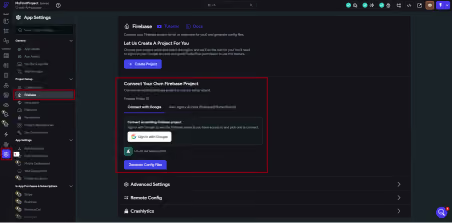
Firebase is the most commonly used backend with FlutterFlow because of its native integration, serverless architecture, and real-time capabilities.
Key Features

  • Firestore (NoSQL Database)
  • Real-time Data Synchronization
  • Firebase Authentication
  • Cloud Functions
  • Cloud Messaging (FCM)
  • Cloud Storage

Architecture

FlutterFlow App
       │
       ▼
  Firebase SDK
       │
       ▼
Firestore + Authentication + Cloud Functions

Advantages

  • Native FlutterFlow integration
  • Minimal setup required
  • Real-time database updates
  • Fully serverless
  • Automatic scaling
  • Built-in authentication
  • Push notifications with Firebase Cloud Messaging

Limitations

  • NoSQL can become difficult for complex relational data
  • Costs may increase with inefficient queries
  • Vendor lock-in to Google's ecosystem

2. Supabase (Open-Source Firebase Alternative)

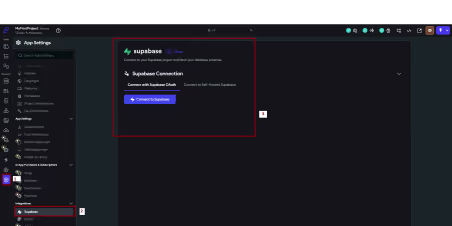
Supabase provides a PostgreSQL-based backend with SQL support while still offering many Backend-as-a-Service features.
Key Features

  • PostgreSQL Database
  • Real-time Subscriptions
  • Authentication
  • File Storage
  • Edge Functions

Architecture

FlutterFlow App
       │
       ▼
Supabase API Layer
       │
       ▼
PostgreSQL Database

Advantages

  • SQL relational database
  • Open-source
  • Self-hostable
  • Excellent for structured data
  • Real-time subscriptions

Limitations

  • Less native FlutterFlow integration
  • More manual API configuration
  • Smaller ecosystem than Firebase

3. API-Based Backend (Xano)

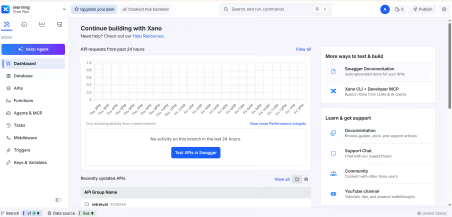
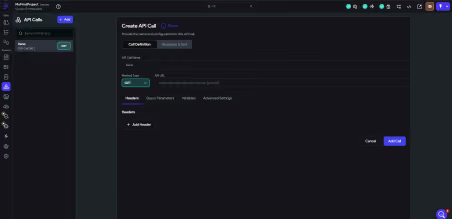
Xano is a no-code backend platform that provides REST APIs with built-in database management and business logic.
Key Features

  • Auto-generated REST APIs
  • PostgreSQL Database
  • Visual Logic Builder
  • Authentication
  • Workflow Automation

Architecture

FlutterFlow App
       │
       ▼
  REST API Calls
       │
       ▼
  Xano Backend
       │
       ▼
Database + Business Logic

Advantages

  • Highly flexible backend logic
  • Works with any frontend
  • Excellent for complex workflows
  • No server management

Limitations

  • No native real-time updates
  • Requires API integration
  • Higher latency than direct SDKs
  • More setup for beginners
Feature Firebase Supabase Xano
Real-time Updates ★★★★★ ★★★★☆ ★★☆☆☆
FlutterFlow Integration Native Moderate API-based
Ease of Use Very Easy Moderate Moderate
Scalability High High High
Database Type NoSQL SQL (PostgreSQL) SQL (PostgreSQL)
Push Notifications Built-in Limited Manual Setup
Server-side Logic Cloud Functions Edge Functions Built-in Workflows

5. Why Firebase is the Best Choice for FlutterFlow

Although all three platforms are excellent, Firebase offers the smoothest development experience with FlutterFlow.

1. Real-Time Data Synchronization

Firestore automatically updates your app whenever data changes.

Ideal for:

  • Chat applications
  • Live dashboards
  • Multiplayer apps
  • Collaborative tools

No polling or manual refresh logic is required.

2. Native FlutterFlow Integration

Firebase is directly supported inside FlutterFlow.

Benefits include:

  • One-click setup
  • Firestore data binding
  • Automatic schema detection
  • Visual query builder

This significantly reduces development time.

3. Push Notifications

Firebase Cloud Messaging (FCM) supports:

  • Device notifications
  • Event-triggered alerts
  • Marketing campaigns
  • User engagement messages

4. Cloud Functions

Cloud Functions let you run backend code without managing servers.

Example:

User Registration
       │
       ▼
Cloud Function Triggered
       │
       ▼
Welcome Email Sent

5. Authentication

Firebase Authentication supports:

  • Email & Password
  • Google Sign-In
  • Apple Sign-In
  • Phone Authentication

6. Automatic Scalability

Firebase automatically manages:

  • Server scaling
  • Load balancing
  • Infrastructure
  • Availability

No server maintenance is required.

6. Architecture Overview

Firebase

FlutterFlow
    │
    ▼
Firebase SDK
    │
    ▼
Firestore + Authentication + Functions + Messaging

Supabase

FlutterFlow
    │
    ▼
Supabase API
    │
    ▼
PostgreSQL Database

Xano

FlutterFlow
    │
    ▼
REST API
    │
    ▼
Xano Backend
    │
    ▼
Database + Business Logic

Conclusion

Each backend serves different project requirements.

PlatformBest ForFirebaseReal-time mobile applications with minimal setupSupabaseSQL-based applications with relational dataXanoComplex APIs and custom backend workflows

Final Recommendation

For most FlutterFlow projects—including MVPs, production mobile apps, SaaS products, and startup applications—Firebase offers the best combination of speed, simplicity, scalability, and native FlutterFlow integration.

FAQs

1. Which database is best for FlutterFlow?

Firebase is generally the best database for FlutterFlow because it offers native integration, real-time synchronization, built-in authentication, push notifications, and a serverless architecture that simplifies app development.

2. Can I use Supabase with FlutterFlow?

Yes. FlutterFlow supports Supabase integration, allowing developers to use a PostgreSQL relational database, authentication, and real-time subscriptions. However, it requires more manual configuration than Firebase.

3. Is Xano a good backend for FlutterFlow?

Yes. Xano is a powerful API-based backend that works well with FlutterFlow for applications requiring complex business logic and custom workflows. It integrates through REST APIs rather than native backend support.

4. What is the difference between Firebase and Supabase?

Firebase uses a NoSQL Firestore database and provides seamless FlutterFlow integration with real-time updates and mobile-focused services. Supabase is built on PostgreSQL, making it better suited for applications requiring structured relational data and SQL queries.

5. Does FlutterFlow support SQL databases?

Yes. FlutterFlow supports SQL-based databases through Supabase and API integrations. Developers can also connect custom backends that expose REST or GraphQL APIs.

6. Which backend is better for real-time FlutterFlow apps?

Firebase is the strongest option for real-time applications because Firestore automatically synchronizes data across devices without additional configuration. Supabase also supports real-time subscriptions, while Xano typically requires additional implementation for real-time functionality.

7. Is Firebase free for FlutterFlow projects?

Firebase offers a generous free tier suitable for many MVPs and small applications. As your app grows, pricing is based on usage, including database reads, writes, storage, and network traffic.

8. When should I choose Supabase instead of Firebase?

Supabase is a better choice when your application relies on relational data models, SQL queries, complex joins, or when you prefer an open-source and self-hosted backend solution.

9. Can I switch from Firebase to Supabase later?

Yes, but migrating between backends requires moving your data, updating authentication, and modifying database queries and API integrations. Choosing the right backend early can reduce migration effort.

10. Which backend is recommended for FlutterFlow MVPs?

For most MVPs and production-ready mobile applications, Firebase is the recommended backend due to its native FlutterFlow integration, rapid setup, real-time capabilities, and automatic scalability.
Incept MVP
Typically Replies within a day
Incept MVP
Hi there 👋
How can I help you?
Start Chat