


How to Structure Firebase Database for FlutterFlow Application
What is Firebase Database?
Firebase Database is Google's cloud storage system where your app stores all its data. Think of it like a digital filing cabinet or warehouse for your app.
The Three Layers:
- Firebase = The entire cloud system (made by Google)
- Firestore = The actual database inside Firebase (where data lives)
- Collections & Documents = How data is organized inside Firestore
Real-World Analogy: Like organizing a library:
- Library = Firebase (entire system)
- Sections = Collections (like "Fiction", "History")
- Individual Books = Documents (like one specific book)
- Content in book = Fields (the actual information)
Real-World Examples
Example 1: Doctor's Appointment Booking App
When you book a doctor's appointment through an app, here's how the data is organized:
Collection: Appointments
Document: Appointment #1
Fields: appointment_time (3:00 PM), patient_name (Ahmed), doctor_name (Dr. Ali), status (Completed), notes (Regular checkup)
Example 2: Online Shopping App
When you shop online, your data is split across multiple collections:
Users Collection - stores customer information (name, email, address)
Products Collection - stores clothing details (size, color, price)
Orders Collection - stores purchase records (what was bought, when, by whom)
Payments Collection - stores payment details (amount, date, status)
When building an application in FlutterFlow, one of the most important steps is designing a proper Firebase database structure. A well-organized database helps your app perform better, keeps data management simple, and makes it easier to build features like user profiles, appointments, orders, chats, or any other dynamic functionality.
FlutterFlow uses Firebase Firestore as a backend database. Unlike traditional SQL databases that use tables and rows, Firestore uses a collection-based structure.
Why Do You Need a Database?
Problems Without a Database:
- When user creates profile → where does it go?
- When user books appointment → how is it saved?
- When user places order → where is it stored?
- Without database = data is lost
Problems Solved by Database:
- User data stays safe in cloud (not on phone)
- User can access their data anytime
- Multiple users can have their own data
- App can load data quickly
- Backup of all information exists
Why Firebase Specifically?
- Made by Google (safe & reliable)
- Easy to use with FlutterFlow
- Secure (protects user data)
- Scalable (grows with your app)
Understanding Firebase Firestore Structure
A collection works like a table in a traditional database. A document works like a record or row, and fields store the actual data.In Firebase Firestore, the structure is divided into three main parts:
- Collection
- Document
- Fields
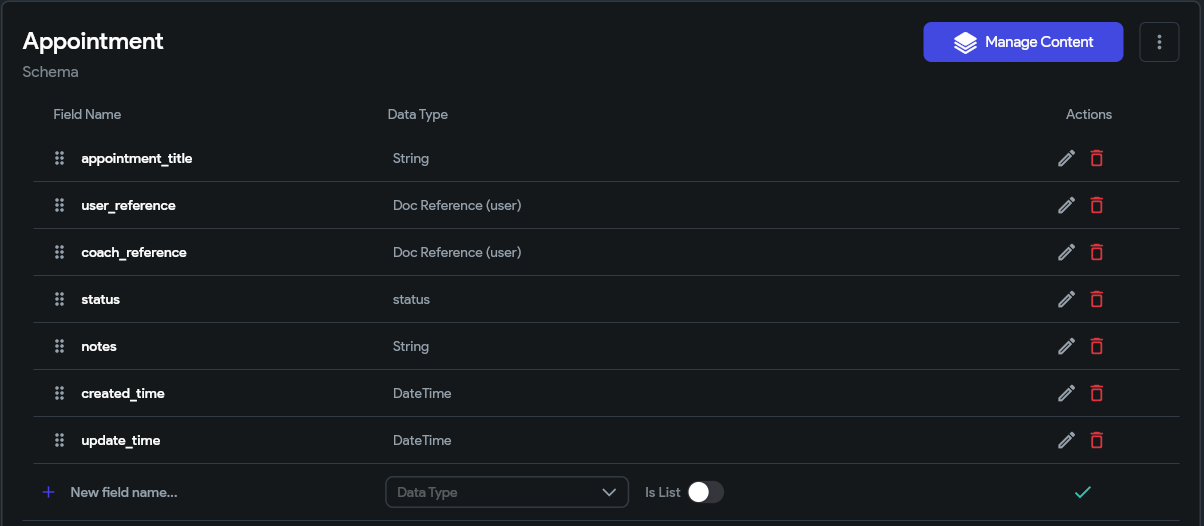
For example, if you are creating an Appointment booking application, you can create a collection called:
“Appointments”
Inside this collection, every appointment will have its own document containing different fields.
Example fields:
- appointment_title (String)
- user_reference (Document reference (user))
- coach_reference (Document reference (user))
- status (String/Enum)
- notes (String)
- created_time (DateTime)
- update_time (DateTime)
This structure allows FlutterFlow widgets and actions to easily read and display appointment data.

Important: Choosing the Right Data Types
- Just like you wouldn't put a book in the shoes section, you need to pick the right data type for each field. Here are the most common:
- Text/String - for names, emails, descriptions (Example: 'Ali', 'hello@email.com')
- Number - for quantities, prices, ages (Example: 1500, 25, 99.99)
- DateTime - for dates and times (Example: March 15, 2024 at 3:00 PM)
- Boolean - for yes/no questions (Example: is_premium=true, is_verified=false)
- Array/List - for multiple values (Example: tags=['fitness', 'health', 'gym'])
- Document Reference - to connect one collection to another (Example: linking orders to users)
Creating Collections in FlutterFlow
To create a Firebase database structure in FlutterFlow:
- Open your FlutterFlow project.
- Go to the Firebase Setup section.
- Open Firestore Database.
- Click on Create Collection.
- Add the required fields with their correct data types.
Choosing the correct data type is important. For example:
- Text data should use String.
- Numbers such as prices should use Double or Integer.
- Multiple values should use List.
- Connections between collections should use Document Reference.
Using Document References for Relationships
In many applications, different collections need to connect with each other. Firebase handles these connections using Document References.
For example, an appointment may belong to a specific user and coach.
Database structure:
users
→ user document
→ name, email, profile image
appointments
→ appointment document
→ user_reference
→ coach_reference
The appointment collection does not need to store all user information again. Instead, it stores a reference to the user document.
Steps to add Document reference: Open firestore > Select/ Create collection > Add field > Add name of field > Set type of data as document from reference > Set the target collection > Save
This keeps the database clean and prevents duplicate data.

Planning Database Structure Before Development
Before creating collections, it is recommended to plan your database according to your application requirements.
For example, an e-commerce app may need:
- users collection
- products collection
- orders collection
- payments collection
A booking app may need:
- users collection
- coaches collection
- appointments collection
- schedules collection
A good database structure should be scalable so new features can be added later without changing the entire system.
Best Practices for Firebase Database in FlutterFlow
Some important practices include:
- Use meaningful collection and field names.
- Avoid storing unnecessary duplicate information.
- Use Document References for connected data.
- Apply proper Firebase security rules.
- Select the correct data type for every field.
- Keep collections organized according to app functionality.
Conclusion
Structuring a Firebase database correctly is a key part of building a successful FlutterFlow application. By understanding collections, documents, fields, and references, developers can create applications that are easier to manage and scale.
FlutterFlow makes Firebase integration simple by providing visual tools for creating collections and connecting data. With a planned database structure, you can build powerful applications with better performance and cleaner data management.
1. What is Firebase Database in FlutterFlow?
Firebase Database, specifically Cloud Firestore, is Google's cloud-hosted NoSQL database used by FlutterFlow to store, manage, and synchronize your app's data in real time.
2. What is the difference between Firebase and Firestore?
Firebase is Google's app development platform that provides services like Authentication, Storage, Hosting, and Analytics. Firestore is the database service within Firebase where your application's data is stored.
3. How is data organized in Firestore?
Firestore organizes data into three levels:
- Collections – Groups of related documents.
- Documents – Individual records inside a collection.
- Fields – The values stored within each document, such as names, emails, dates, or prices.
4. Why is database planning important before building a FlutterFlow app?
Planning your database structure before development helps improve performance, reduces duplicate data, simplifies future maintenance, and makes it easier to add new features as your app grows.
5. What are the most common Firestore field types?
Frequently used Firestore field types include:
- String – Names, emails, descriptions.
- Integer/Double – Prices, quantities, ratings.
- Boolean – True or false values.
- DateTime – Dates and timestamps.
- List (Array) – Multiple values.
- Document Reference – Relationships between collections.
6. How do I create a Firestore collection in FlutterFlow?
Open your FlutterFlow project, navigate to Firestore Database, create a new collection, add the required fields, assign the appropriate data types, and save your schema.
7. What are Document References in Firestore?
Document References create relationships between collections by storing a reference to another document instead of duplicating data. For example, an appointment can reference a user document rather than storing the user's details repeatedly.
8. Why should I use Document References instead of duplicate data?
Using Document References helps:
- Reduce data duplication.
- Keep information consistent.
- Simplify updates.
- Improve scalability.
- Reduce storage requirements.
9. How should I structure a Firebase database for different app types?
The database should reflect your application's features. For example:
- Booking App: Users, Coaches, Appointments, Schedules.
- E-commerce App: Users, Products, Orders, Payments.
- Social App: Users, Posts, Comments, Messages.
Keeping collections organized by feature makes your database easier to maintain.
10. What are the best practices for designing a Firestore database?
Some recommended best practices include:
- Use descriptive collection and field names.
- Choose the correct data type for each field.
- Avoid storing duplicate information.
- Use Document References for relationships.
- Apply Firebase Security Rules.
- Design your database for future scalability.
11. Can I modify my Firestore database after my app is live?
Yes. Firestore allows you to add new collections and fields over time. However, having a well-planned database structure from the beginning minimizes future migrations and reduces development complexity.
12. What are the benefits of using Firebase Firestore with FlutterFlow?
Firestore integrates seamlessly with FlutterFlow, offering real-time synchronization, scalable cloud storage, visual database management, secure data access, flexible querying, and rapid backend development without extensive server-side coding.
.svg)
.svg)


.avif)
