

.avif)
You built your MVP on Lovable. It works. It looks good. And then your first real users ask: "Is this on the App Store?"
That one question exposes a gap most founders don't see coming. Lovable builds web apps. Users want native apps. And the assumption that you now have to scrap everything and hire a mobile team is exactly where most founders lose weeks and tens of thousands of dollars unnecessarily.
You don't have to rebuild. Here's how.
Yes, and Capacitor is how.
Capacitor, built by Ionic, drops directly into your existing Lovable (Vite + React) project. It wraps your web frontend inside a real native Android Studio and Xcode project, then bridges JavaScript calls to native device APIs. Your codebase stays intact. Your backend (Supabase, Firebase, or custom) stays untouched. What changes is what your users experience: a home screen icon, App Store presence, and native device features that a browser tab can never deliver.
React Native doesn't use standard HTML or CSS. Converting a Lovable app would mean rewriting every component from scratch using React Native's own primitives. That's not a conversion, it's a rebuild.
Flutter uses Dart, a completely different language. Same problem: 100% of your Lovable code gets thrown out.
Basic WebView wrappers are the worst option disguised as the easiest one. They're slow, feel broken, and Apple actively rejects them under App Store Guideline 4.2 ("Minimum Functionality"). You will not ship a WebView wrapper on iOS.
Capacitor is the only path that lets you reuse your entire existing frontend while generating real, reviewable native projects for both platforms. That's the difference.
The structure is cleaner than most founders expect:
No new stack. No migration. The Capacitor Bridge is what makes this a real native app rather than a dressed-up browser.
The architecture is straightforward. The work is in the edge cases — and this is where most DIY conversions fail App Store review.
Safe Area and Layout Handling Mobile apps behave differently than mobile browsers. iPhone notches, the Android navigation bar, and home bar insets all require CSS-level handling with safe-area-inset values. Ignoring these produces a UI that looks broken on real devices.
Authentication Persistence Cookie-based auth fails inside native app shells. Sessions expire unpredictably. We replaced web auth with native secure storage — iOS Keychain and Android Keystore — so users stay logged in across restarts and OS memory purges.
Push Notifications Web push is unreliable on native. We wired Capacitor's push notification plugin directly into Apple Push Notification service (APNs) and Firebase Cloud Messaging (FCM) for consistent, rich notification delivery on both platforms.
Deep Linking Universal Links (iOS) and App Links (Android) let shared URLs, password reset flows, and invite links open directly inside the app instead of redirecting to a browser. Without this, your onboarding breaks on mobile.
Native Permission Flows Camera, location, and notifications each require native permission prompts with explicit rationale strings. Both Apple and Google's review process checks for this. Missing or vague permission handling is a common rejection trigger.
App Store Rejection Risk Apple's reviewers look hard at apps that feel like websites. We stripped web-specific behaviors — text selection highlights, double-tap zoom, browser scroll momentum — and replaced them with native UI patterns like smooth screen transitions and pull-to-refresh. This is what gets you past review.
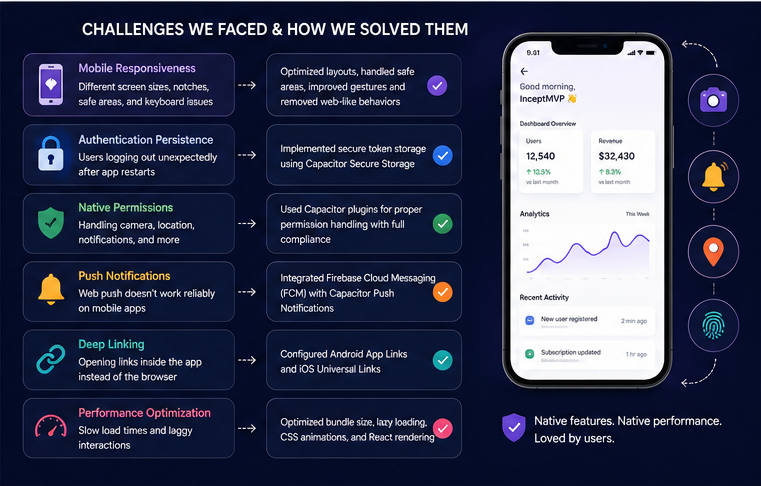
Based on completed conversions using this methodology:
Use Lovable + Capacitor if:
Skip it if:
For roughly 95% of standard Lovable-based products, Capacitor is the right path.
Ready to take your Lovable app from browser to App Store?
InceptMVP specializes in converting AI-generated web apps into polished, store-ready native mobile apps. Play Store deployment, App Store deployment, push notifications, deep linking, and full mobile optimization included.
[Contact InceptMVP to get started.]
Not if it's built correctly. Apple rejects bare WebView wrappers, not Capacitor apps. The distinction is native integrations, native UX patterns, and genuine functionality. Apps built with proper Capacitor implementation pass review.
Weeks for a production-ready conversion compared to four to six months for a native rebuild from scratch.
No. Capacitor generates separate Android and iOS native projects, but both run from the same web frontend. One codebase, two stores.
Any. Supabase, Firebase, custom REST APIs, GraphQL - the native app communicates with your backend exactly as the web app does. No backend changes required.



.svg)
.svg)
.avif)


.avif)
