


Supabase Security in FlutterFlow
Implementation Guide
Covers: API Keys • Row-Level Security • Database Triggers • Edge Functions • Storage
What You Will Learn
FlutterFlow makes it fast to build apps on Supabase — but the default settings leave your database wide open. This guide walks you through every security layer you need to lock it down properly, from the first API key decision to storage policies and role management.
By the end you will know how to:
- Choose the right Supabase API key for FlutterFlow and store it safely using Environment Variables.
- Enable Row-Level Security (RLS) and write policies that automatically filter data by the signed-in user.
- Use database triggers to enforce business rules — such as preventing users from elevating their own role — that RLS alone cannot express.
- Control exactly which columns FlutterFlow can read using database Views, so sensitive fields never reach the client.
- Run privileged operations safely via Edge Functions, keeping your secret key out of the frontend entirely.
- Secure file uploads and downloads with storage bucket policies that mirror your RLS rules.
- Use the pre-launch security checklist to verify every layer before your app goes live.
Why Supabase Security Matters in FlutterFlow
Supabase gives FlutterFlow developers a real PostgreSQL database with a generous free tier and a clean visual integration. That combination makes it easy to ship fast — and easy to ship insecurely.
The core problem is that FlutterFlow runs in the browser or on a user’s device. Any API key, query, or logic you place in a FlutterFlow action is visible to anyone who inspects network traffic. Supabase’s default configuration does not protect you from this — that responsibility sits with you.
Without the patterns in this guide, a typical FlutterFlow + Supabase app has several critical gaps:
- Any authenticated user can query SELECT * FROM any table and read every row — not just their own.
- Sensitive columns — password hashes, Stripe IDs, internal flags — are returned to the client on every query.
- Users can update any field on their own row, including their role, simply by changing the request payload.
- File uploads land in a shared namespace — one user can overwrite another’s files by guessing a path.
The good news: Supabase was built with these problems in mind. Row-Level Security, Edge Functions, storage policies, and database triggers all exist precisely to close these gaps — without requiring a separate backend. Every pattern in this guide runs inside Supabase itself, which means no extra infrastructure, no new services to maintain, and no changes to your FlutterFlow UI.
Work through each section in order. By Section 7 you will have a repeatable security pattern you can apply to every FlutterFlow + Supabase project you build.
1. Supabase API Keys
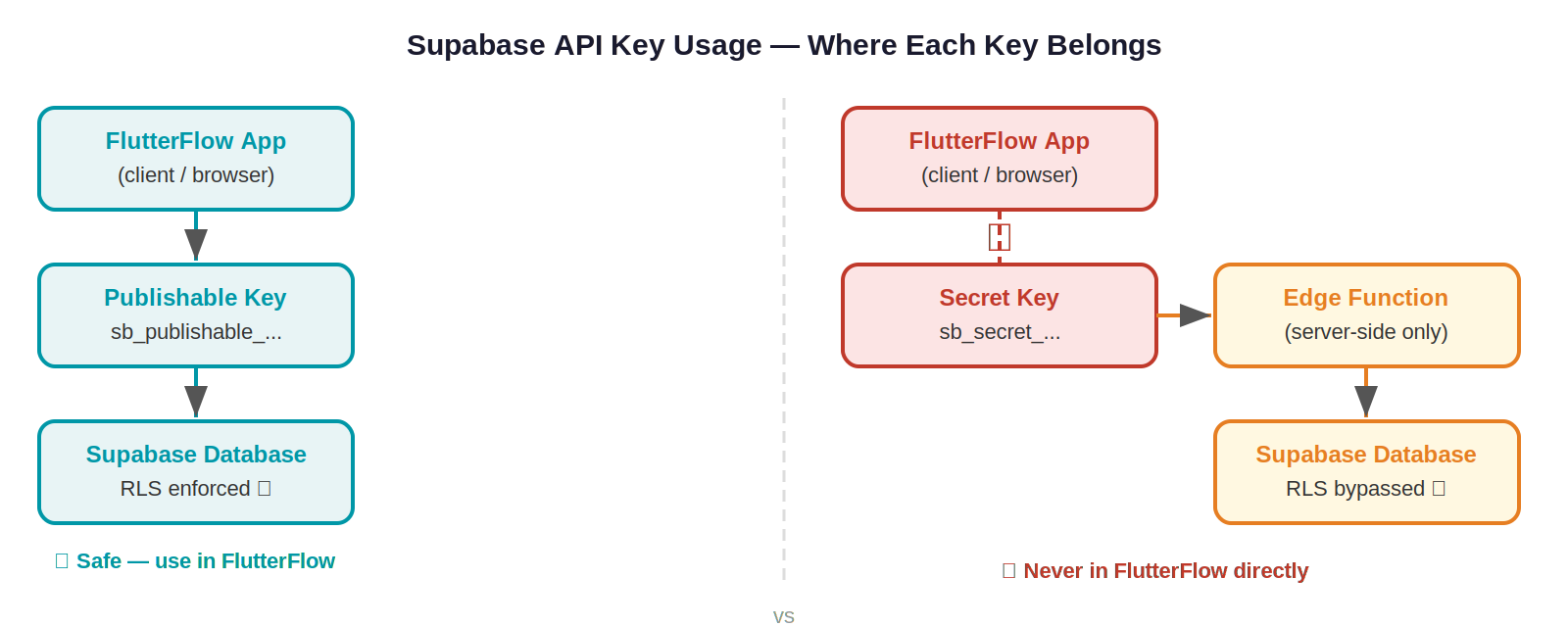
Supabase provides two types of API keys for your project. The legacy JWT-based anon and service_role keys are being phased out — new projects now use the publishable key (sb_publishable_...) and secret key (sb_secret_...) instead, with legacy keys being permanently removed in late 2026. Understanding which key to use — and where — is the first and most important security decision you will make.
⚠️ Warning
If you place the secret key in FlutterFlow's API calls or custom actions, any user who inspects the app traffic can extract it and gain complete admin access to your database — bypassing every security rule you have written.
2. Row-Level Security (RLS)
Row-Level Security (RLS) is Supabase's equivalent of Firestore Rules. It lets you attach fine-grained access policies directly to database tables, so that users can only read or write the rows they are permitted to — even when they share the same table.
2.1 How RLS Works
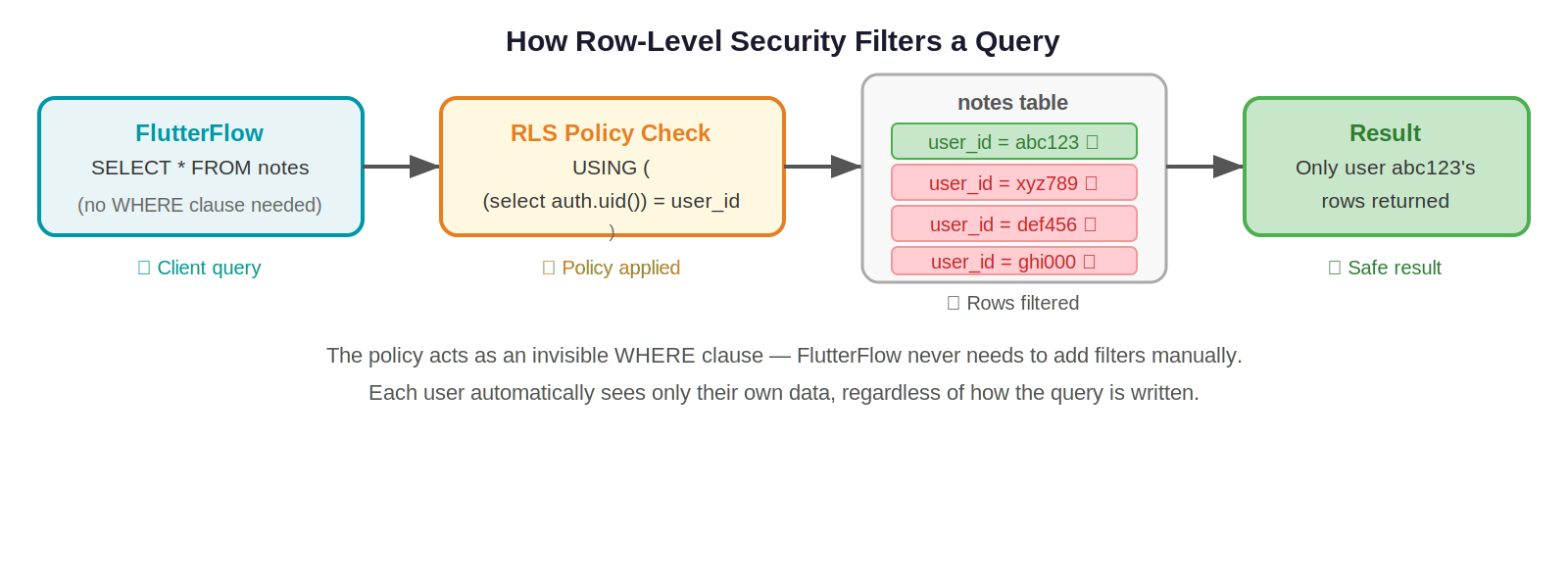
When a query reaches Supabase, the database automatically applies any active policies for that table before returning results. Policies are written in SQL and can reference the currently authenticated user via the built-in function:
auth.uid() -- returns the UUID of the currently signed-in user
Every table starts with RLS disabled. You must explicitly enable it and then define policies for each operation (SELECT, INSERT, UPDATE, DELETE). In all policy code, always wrap auth.uid() in a subquery — (select auth.uid()) = user_id — rather than the bare form. Supabase’s official documentation confirms this caches the result per statement and can improve query performance by up to 95%. The examples in this guide use the optimised form throughout.
⚠️ Warning
Enabling RLS on a table with no policies returns zero rows for all users — even the table owner. Always add at least one policy after enabling RLS.
⚠️ Warning Unauthenticated requests and null auth.uid()
When no user is signed in (or a session has expired), auth.uid() returns null. A policy written as USING (auth.uid() = user_id) will silently return zero rows rather than an error — null = user_id is always false in SQL. Supabase’s official docs recommend making the intent explicit: USING (auth.uid() IS NOT NULL AND (select auth.uid()) = user_id). This prevents unexpected empty results from expired sessions and makes the policy easier to reason about.
2.2 Enabling RLS in Supabase
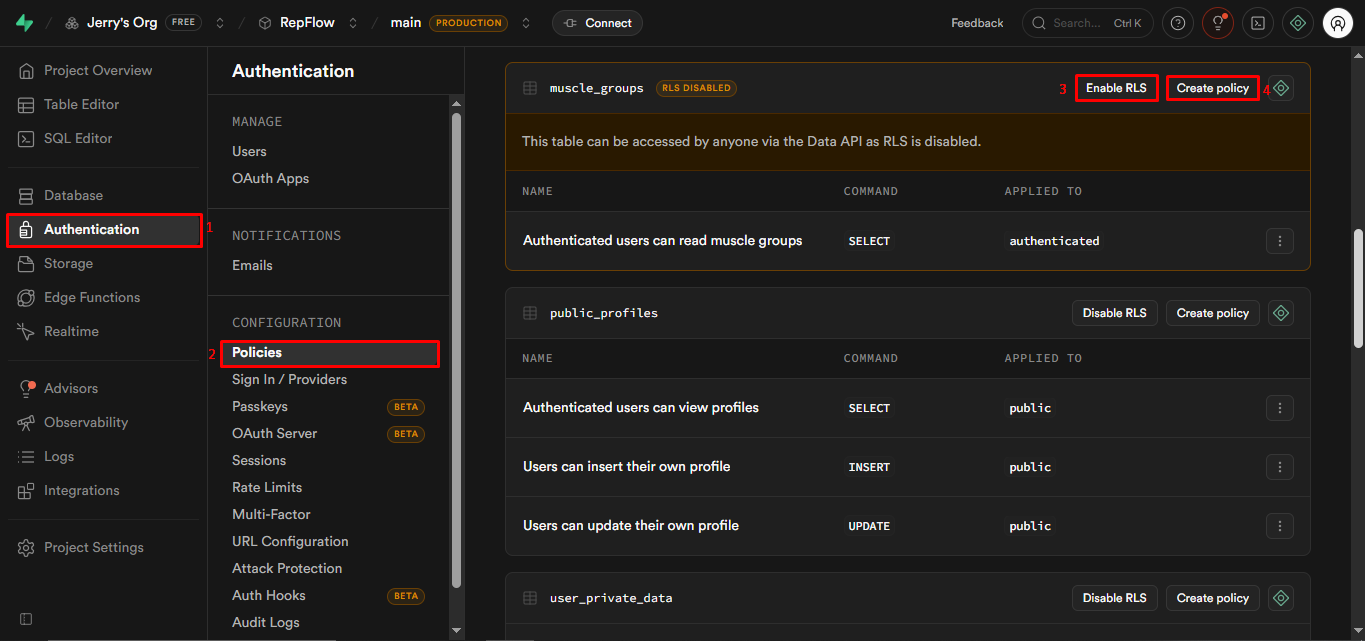
- In the Supabase dashboard, with your project opened.
- Navigate to Authentication > Policies in the left sidebar.
- Find your table and click Enable RLS.
- Click New Policy to start writing access rules.
2.3 Common Policy Patterns
Pattern 1 — Users can only read their own rows
-- Applied to SELECT operations on the 'orders' table
CREATE POLICY "Users see own orders"
ON orders
FOR SELECT
USING ( (select auth.uid()) = user_id );
-- The USING clause filters rows automatically.
-- If user_id does not match the logged-in user, the row is invisible.
Pattern 2 — Only authenticated users can read public records
-- Applied to SELECT on the 'products' table
CREATE POLICY "Authenticated users can view products"
ON products
FOR SELECT
TO authenticated -- only applies to logged-in users
USING ( true ); -- no additional row filter needed
Pattern 3 — Users can only edit their own profile
CREATE POLICY "Users edit own profile"
ON profiles
FOR UPDATE
USING ( (select auth.uid()) = id ) -- must be their row
WITH CHECK ( (select auth.uid()) = id ); -- and the new data must still belong to them
💡 Example
Real-world scenario: You have a 'notes' table where every row has a user_id column.
Without RLS: Any authenticated user can query SELECT * FROM notes and get every note from every user.
With the pattern above: A SELECT query automatically adds WHERE (select auth.uid()) = user_id, so users only ever see their own notes — no change required in FlutterFlow.
2.4 FlutterFlow Considerations
FlutterFlow generates SELECT * queries by default. This means it fetches every column from a table. With RLS enabled, row-level filtering still works — users only get their own rows — but all columns in those rows are returned.
- Column visibility: RLS does not hide individual columns, only rows. If a column contains sensitive data, do not rely on RLS alone to protect it. Use database Views to expose only the columns FlutterFlow needs.
- Column-level privileges: Supabase supports column-level GRANT/REVOKE, but restricting a column that FlutterFlow tries to SELECT causes query errors. Use Views as a safer alternative.
- Testing policies: Use Supabase's built-in policy testing feature (Authentication > Policies > Test policy) to verify rules before deploying.
3. Database Triggers
A database trigger is a piece of logic that runs automatically when a specific event happens on a table, such as a row being inserted, updated, or deleted. Triggers are ideal for enforcing business rules that cannot be expressed through RLS policies alone.
3.1 How Triggers Work
In Supabase, a trigger calls a PostgreSQL function (written in PL/pgSQL) when its event fires. You define:
- When: BEFORE or AFTER the operation.
- What: INSERT, UPDATE, or DELETE (or a combination).
- What to do: The database function that should run.
Event (INSERT/UPDATE/DELETE)
|
v
Trigger fires
|
v
Database function runs
(can read NEW and OLD row data,
modify values, raise errors, etc.)
3.2 Creating a Trigger in Supabase
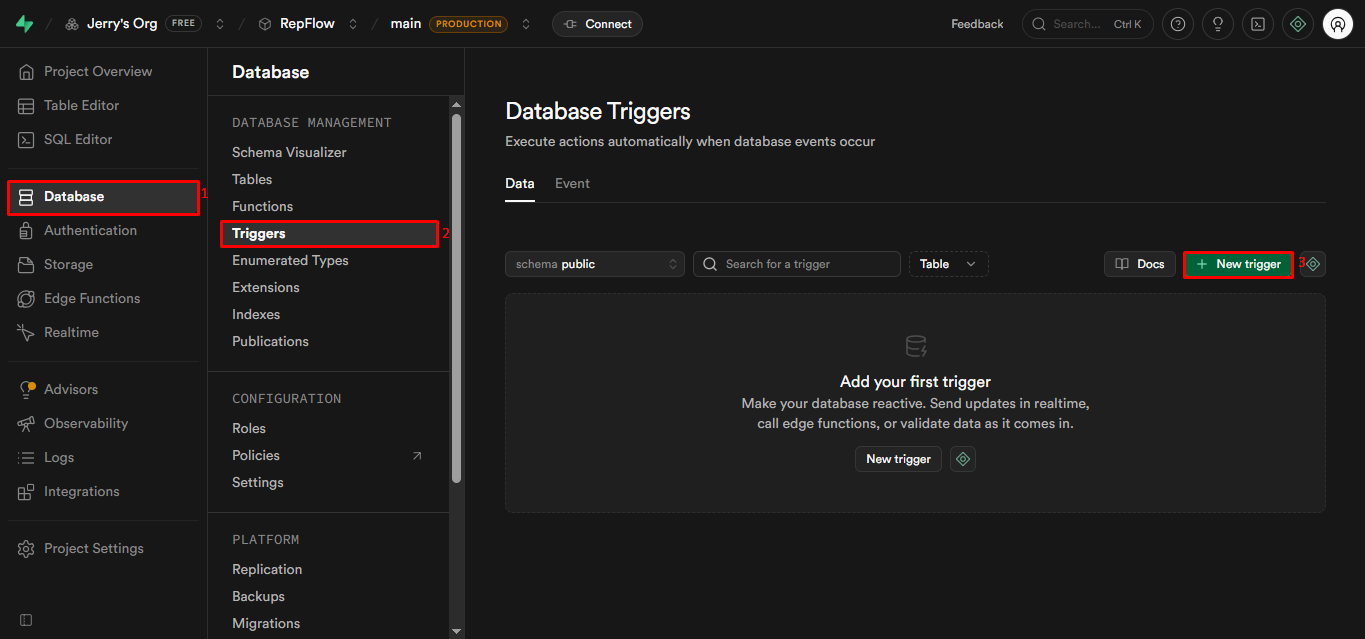
Triggers are created through the Supabase dashboard (Database > Triggers) or via SQL. The two-step process is: first create the function, then attach a trigger to it.
Step 1 — Write the Function
-- This function prevents users from assigning 'admin' role to themselves
CREATE OR REPLACE FUNCTION prevent_self_admin()
RETURNS TRIGGER AS $$
BEGIN
-- NEW refers to the row about to be inserted or updated
IF NEW.role = 'admin' THEN
-- Raise an error. Supabase returns this message to the client.
RAISE EXCEPTION 'You cannot assign the admin role to yourself.';
END IF;
RETURN NEW; -- allow the operation to proceed
END;
$$ LANGUAGE plpgsql;
Step 2 — Attach the Trigger
CREATE TRIGGER check_role_on_insert
BEFORE INSERT OR UPDATE ON user_profiles
FOR EACH ROW
EXECUTE FUNCTION prevent_self_admin();
💡 Example
Scenario: A user tries to update their own profile and sets role = 'admin'.
Result: The trigger fires BEFORE the row is saved, the function raises an exception,
and the update is cancelled. The error message is returned to FlutterFlow,
where you can display it to the user.
3.3 Where Role Data Lives
There are two common approaches to storing user roles:
📝 Note
For most FlutterFlow apps, storing roles in a user_profiles table is simpler to work with. Pair it with a BEFORE INSERT/UPDATE trigger to prevent role self-assignment, and an RLS policy that prevents users from updating their own role column.
3.4 Other Useful Trigger Patterns
- Auto-create profile on signup: A trigger on auth.users AFTER INSERT can automatically create a row in your user_profiles table, so every new user always has a profile record.
- Audit logging: A trigger on sensitive tables can write a copy of changed data to an audit_log table, recording who changed what and when.
- Enforcing data constraints: Triggers can validate complex rules that SQL CHECK constraints cannot express, such as cross-table business logic.
4. Managing Data Exposure in FlutterFlow
FlutterFlow's Supabase integration generates SELECT * queries by default. This fetches every column from a table, including any sensitive fields such as internal IDs, hashed data, or admin flags that the frontend should never see. RLS protects which rows are returned, but it does not filter columns.
4.1 The Problem with SELECT *
⚠️ Warning
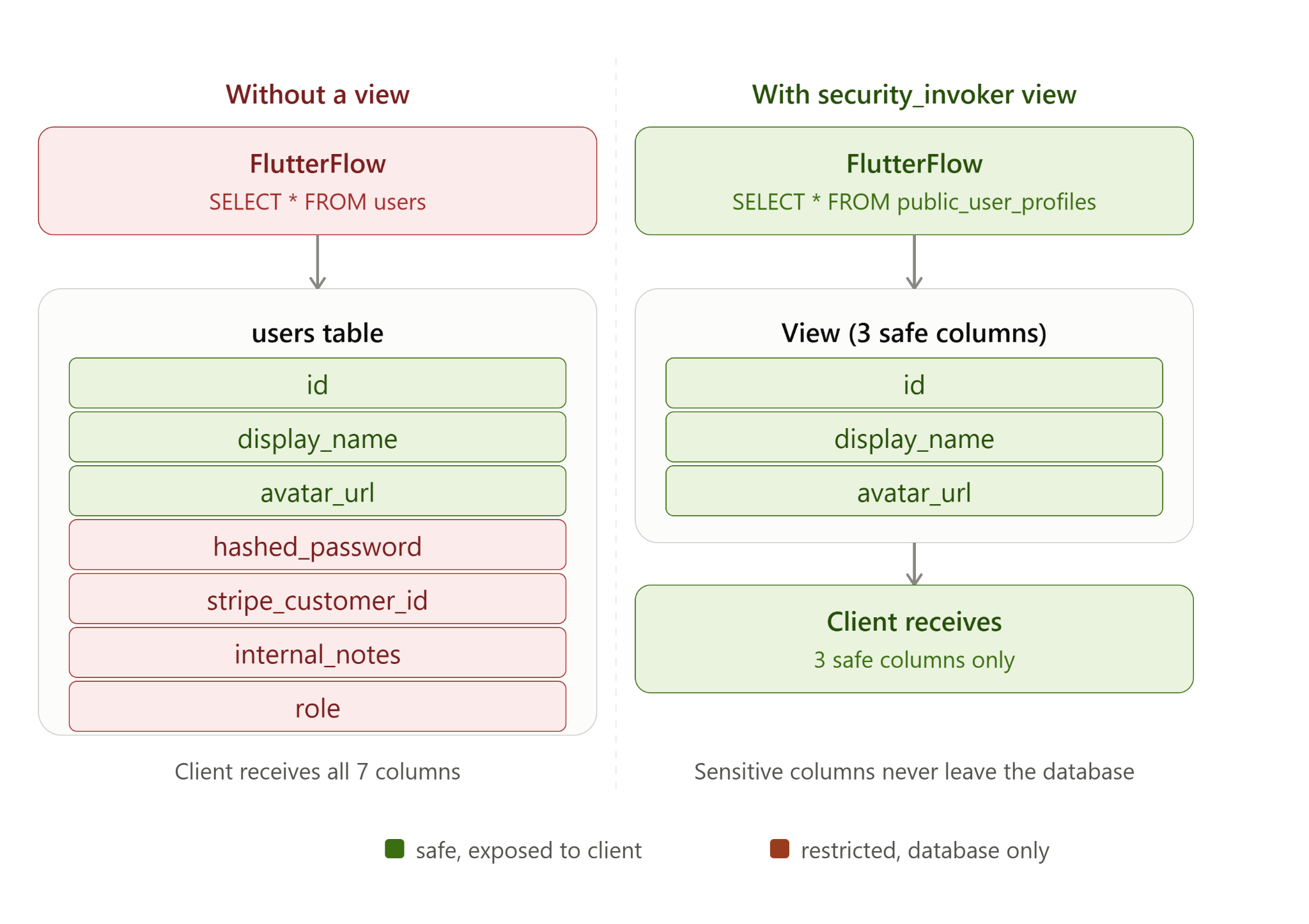
Example: Your users table has columns: id, email, display_name, hashed_password, role, stripe_customer_id, internal_notes.
FlutterFlow generates: SELECT * FROM users WHERE id = auth.uid()
This returns ALL columns to the client — including stripe_customer_id and internal_notes, which should never leave the backend.
4.2 Solution: Database Views
A Supabase View is a saved SQL query that looks and behaves like a table. You can create a view that exposes only the columns that the frontend legitimately needs, then point FlutterFlow at the view instead of the underlying table.
Creating a Safe View
-- Create a view that only exposes the safe columns
CREATE VIEW public_user_profiles
WITH (security_invoker = true) -- required: enforces RLS on the underlying table
AS
SELECT
id,
display_name,
avatar_url,
created_at
-- Intentionally omitting: hashed_password, role, stripe_customer_id, internal_notes
FROM users;
Now configure FlutterFlow to query public_user_profiles instead of users. FlutterFlow’s SELECT * on this view will only return the four safe columns. The WITH (security_invoker = true) clause is critical — without it, the view runs as the postgres superuser and bypasses all RLS policies, meaning every user could read every row.
📝 Note
Views are read-only by default. If users need to update their profile, create a separate, scoped UPDATE policy on the underlying table (not the view), or use an Edge Function.
4.3 Column Privileges (Why They Break in FlutterFlow)
Column-level privileges (GRANT SELECT (col1, col2) TO ...) are the PostgreSQL-native way to restrict column access. However, because FlutterFlow always requests all columns via SELECT *, revoking a column causes a permission error rather than silently omitting it. This makes column privileges unreliable in FlutterFlow. Stick with Views.
5. Edge Functions
Edge Functions are Supabase's equivalent of Firebase Cloud Functions. They run server-side TypeScript/JavaScript code in a secure environment, outside the reach of the client. They are the correct place to perform any operation that requires admin privileges or that should not be exposed to users.
5.1 When to Use Edge Functions
- Admin operations: Any task that requires elevated privileges (e.g. deleting another user's data, updating roles, sending system emails) — use the secret key inside the function, never in the client.
- Sensitive business logic: Charging a payment, calculating prices, generating signed URLs.
- Third-party API calls: Calling external services whose API keys must never reach the frontend.
- Bypassing RLS safely: Some operations legitimately need to read or write rows that RLS would otherwise block.
5.2 Authentication for Edge Functions
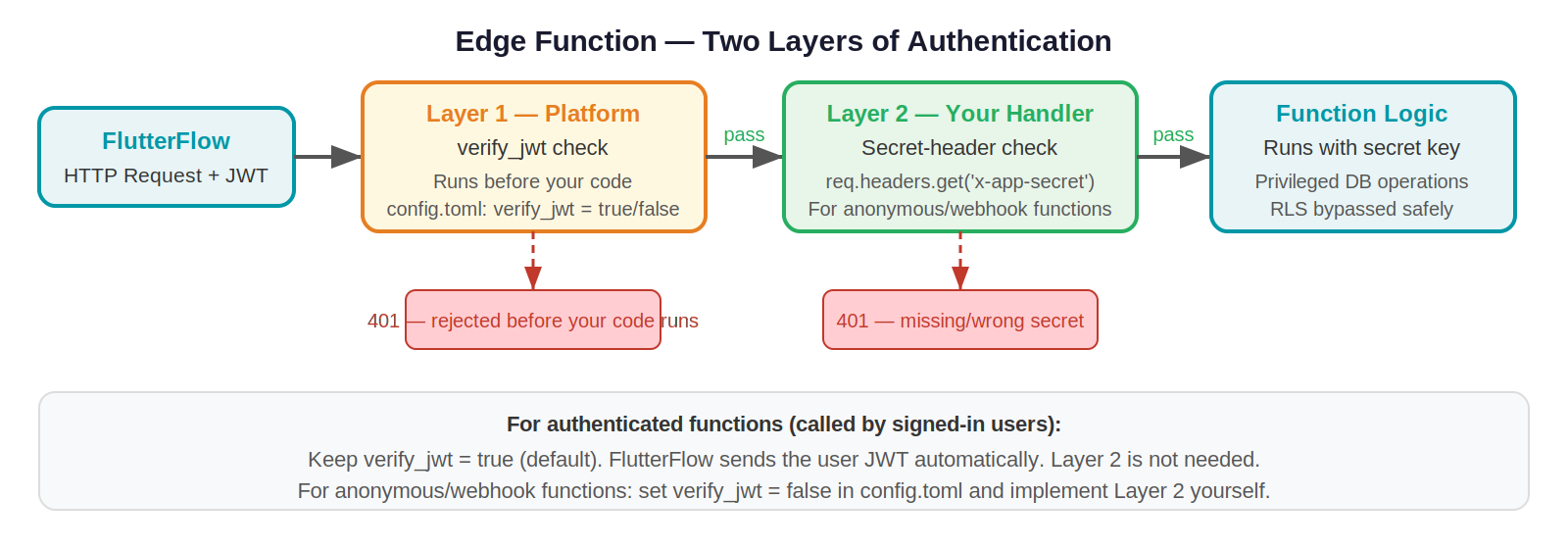
Edge Functions have two authentication layers. The first is a platform-level JWT check that runs before your code: by default, verify_jwt = true means the platform rejects any request without a valid user JWT before your handler even runs. You can disable this per function by setting verify_jwt = false in your project’s supabase/config.toml file. The second layer is whatever credential check you write inside your handler. The correct combination depends on who is calling the function:
Securing Anonymous Edge Functions
If a function must be callable without a user JWT (e.g. a webhook from Stripe or a public contact form), first set verify_jwt = false for that function in supabase/config.toml. This disables the platform JWT check so the function can be reached without a login token. You must then add your own security check inside the handler — the recommended approach is a shared secret:
# supabase/config.toml
[functions.my-public-function]
verify_jwt = false # disables platform JWT check for this function only
- Generate a secret key (a long random string, Base64 encoded).
- Store it in Edge Function environment variables in Supabase (Settings > Edge Functions > Secrets). Never hard-code it.
- In FlutterFlow, store the same key in a private environment variable.
- Include the key in the request (e.g., in a custom header like X-App-Secret).
- In the Edge Function, validate the header before proceeding. Reject requests without the correct key.
// Inside your Edge Function (TypeScript)
const APP_SECRET = Deno.env.get('APP_SECRET');
Deno.serve(async (req) => {
const clientSecret = req.headers.get('x-app-secret');
if (clientSecret !== APP_SECRET) {
return new Response('Unauthorized', { status: 401 });
}
// Safe to proceed — request came from our app
// ... your function logic here
});
5.3 Calling Edge Functions from FlutterFlow
FlutterFlow supports calling Edge Functions via Custom Actions or API Call blocks:
- Custom Actions: Write Dart code that makes an HTTP POST to the Edge Function URL. Pass the user's JWT from FlutterFlow's authentication state.
- API Calls: Define the Edge Function URL as an API endpoint in FlutterFlow's API manager. Add authentication headers using environment variables.
📝 Note
For unauthenticated Edge Functions called from FlutterFlow: store the App Secret as a FlutterFlow Environment Value. Reference it in your API call header. Do not store secrets in app state or local variables — they would be visible in memory.
6. Storage
Supabase Storage works similarly to Firebase Storage. Files are organized into buckets, and access is controlled through storage policies — which follow the same SQL-based syntax as RLS policies.
6.1 Public vs. Private Buckets
6.2 Storage Policies
Just like database tables, storage buckets should have explicit policies. Without policies, a private bucket denies all access (good default), but you need policies to allow legitimate uploads and downloads.
Example — Users can only upload to their own folder
-- Policy on the 'user_files' bucket
-- The file path is expected to be: /{user_id}/filename
CREATE POLICY "Users upload to own folder"
ON storage.objects
FOR INSERT
TO authenticated
WITH CHECK (
bucket_id = 'user_files'
AND (storage.foldername(name))[1] = auth.uid()::text
);
-- Same pattern for SELECT (download)
CREATE POLICY "Users read own files"
ON storage.objects
FOR SELECT
TO authenticated
USING (
bucket_id = 'user_files'
AND (storage.foldername(name))[1] = auth.uid()::text
);
6.3 Using Storage in FlutterFlow
- Public bucket files: Upload the file, get the public URL, and store it as a string column in your database table. Reference this URL in FlutterFlow image widgets — the same pattern as Firebase Storage.
- Private bucket files: Use a Custom Action or Edge Function to call supabase.storage.from('bucket').createSignedUrl(path, expirySeconds). Return the signed URL to FlutterFlow and use it as a temporary image/download source.
- File path convention: Always prefix uploaded files with the user's UID (e.g., auth.uid()/filename.jpg). This makes storage policies simple and prevents path collisions.
💡 Example
Public profile picture workflow:
1. User picks an image in FlutterFlow.
2. FlutterFlow uploads to Supabase Storage 'avatars' bucket (public).
3. Supabase returns the public URL.
4. FlutterFlow updates the user_profiles table, storing the URL in avatar_url.
5. Any profile display in the app just reads avatar_url — no auth needed to show the image.
7. Security Checklist
Use this checklist before launching any FlutterFlow + Supabase app.
Authentication & Connection
- ☐ The publishable key (sb_publishable_...) is used for all client-side FlutterFlow connections — the secret key is never placed in FlutterFlow under any circumstances.
- ☐ Legacy anon and service_role keys are migrated to publishable and secret keys before the end of 2026 deadline.
- ☐ Any Edge Function secrets are stored in Supabase Secrets, not in FlutterFlow environment variables or app state.
Row-Level Security
- ☐ RLS is enabled on every table that contains user data.
- ☐ At least one policy exists on each RLS-enabled table.
- ☐ Policies are tested using Supabase's policy testing tool.
- ☐ Sensitive columns are hidden using Views, not column-level privileges.
Edge Functions
- ☐ All admin operations use Edge Functions, not direct client queries.
- ☐ Authenticated functions validate the JWT before processing.
- ☐ Anonymous functions validate a shared App Secret header.
- ☐ Edge Function secrets are stored in Supabase Secrets, not in code.
Storage
- ☐ All buckets have explicit storage policies — no bucket is left with default open access.
- ☐ User uploads are prefixed with the user's UID.
- ☐ File URLs are never exposed directly to users or embedded in the UI.
- ☐ Files are accessed only through RLS-protected table fields — the URL is stored in the database and the RLS policy on that table controls who can read it.
- ☐ Storage bucket policies mirror the RLS rules on the table that references them, so access is consistently enforced at both layers.
.svg)
.svg)


.avif)
